Post by
 Fully Local, Nothing Leaves the Box
How to build a fully local retrieval pipeline on Ubuntu 24.04 LTS that reads from your organization’s context, grounds a local language model in it, and cites its sources. No document, embedding, or query ever leaves the machine.
Stack
- Platform: Ubuntu 24.04 LTS
- Stack: Python 3.12 · Ollama · Chroma · pdfplumber · python-docx
- Privacy: fully local. No external API calls at index time or query time.
This is the Phase 3 step of the Organizational Context Blueprint: you have already audited your sources, captured what matters, structured it, and governed it. Now you point AI at it. If you have not done that groundwork, do it first. AI grounded in a messy, ungoverned pile of documents produces confident, wrong answers.
Prerequisites
Requirement Details:
- Ubuntu 24.04 LTS -> Fresh install or existing server. Root or sudo access required.
- Python 3.12 -> Ships with Ubuntu 24.04. No separate install needed.
- 16 GB RAM recommended -> An 8B-parameter local model needs roughly 6 to 8 GB at load. 8 GB RAM will work with a smaller model; see the note in Stage 2.
- 15 GB disk space -> For the model weights, Python packages, and the vector store.
- A GPU is optional -> Everything below runs on CPU. A supported GPU makes generation faster but is not required.
- Your context -> A folder of documents (txt, md, pdf, docx) and a source register (a CSV listing each file, its owner, sensitivity, and status). The register is the output of Phase 2.
Before you begin
Run every command as a non-root user with sudo privileges. Running as root directly is not recommended. If you are unsure which user you are, run:
whoamiConfirm you see your username, not root.
How the pipeline works
Before touching a terminal, understand the data flow. Every stage runs locally. The only network access is a one-time download of packages and model weights.
How the pipeline works
Before touching a terminal, understand the data flow. Every stage runs locally. The only network access is a one-time download of packages and model weights.
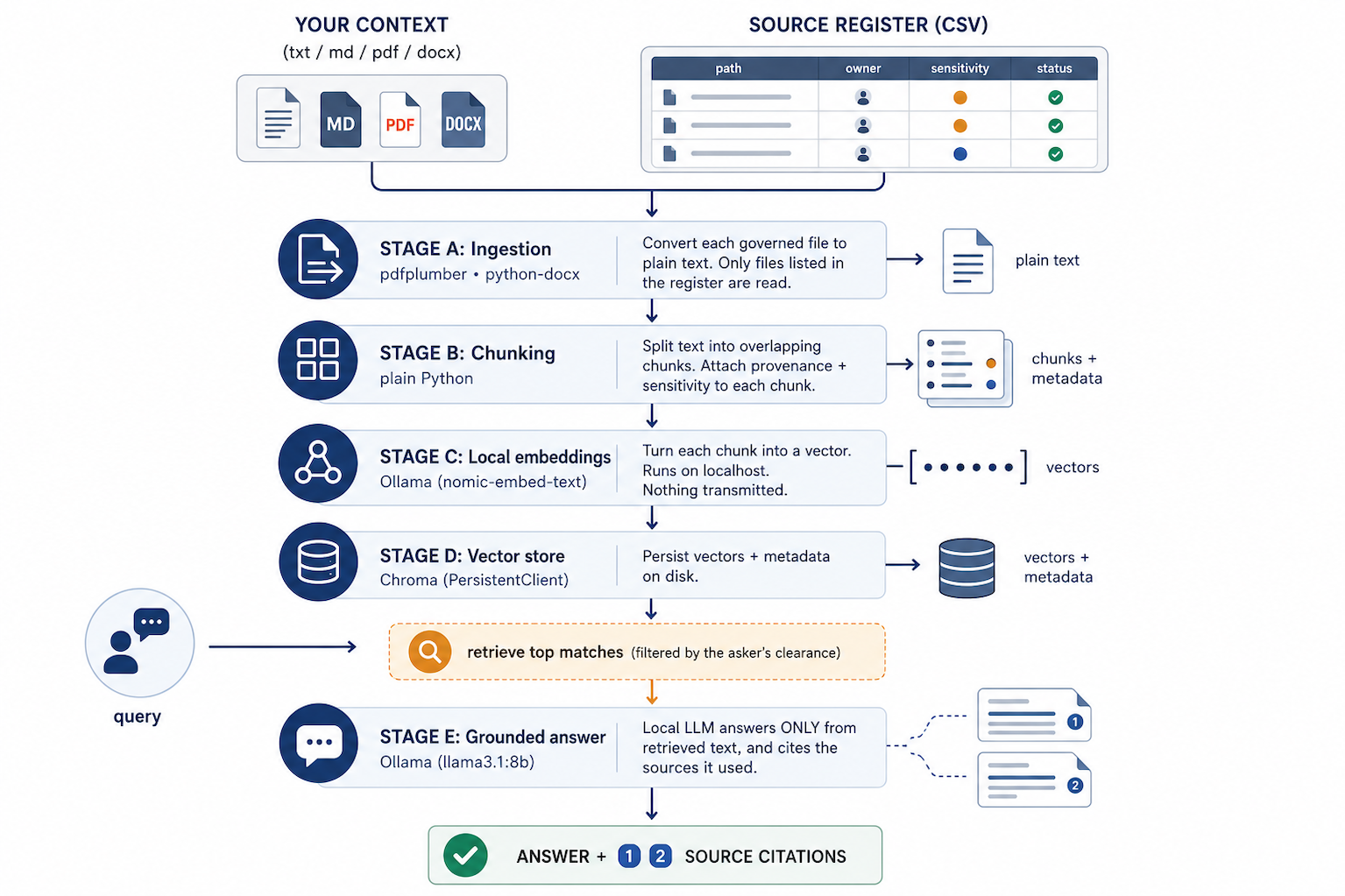
The important design decision: only files listed in your source register are ever indexed, and each chunk carries the sensitivity of its source, so retrieval can be filtered by who is asking. Governance is enforced at index time, not bolted on later.
Stage 1: Prepare the Ubuntu host
Update the system and install the Python tooling. Ubuntu 24.04 ships Python 3.12, but the virtual-environment and pip packages are separate.
sudo apt update
sudo apt install -y python3.12-venv python3-pip curl
Create the project directory and a virtual environment:
mkdir -p ~/context-ai
cd ~/context-ai
python3 -m venv venv
source venv/bin/activate
Your shell prompt should now be prefixed with (venv). Every later command assumes the venv is active. If you open a new terminal, re-run cd ~/context-ai and source venv/bin/activate.
Stage 2: Install and verify Ollama
Ollama runs the language model and the embedding model locally. Install it with the official script:
curl -fsSL https://ollama.com/install.sh | shThe installer sets up a background service. Confirm it is running:
systemctl status ollama --no-pagerYou should see active (running). Ollama listens on http://localhost:11434 by default.
Pull the two models you need. One for generation, one for embeddings:
ollama pull llama3.1:8b
ollama pull nomic-embed-text
Note on hardware: llama3.1:8b needs roughly 6 to 8 GB of RAM. If your machine has 8 GB total or less, pull a smaller model instead (for example llama3.2:3b) and change LLM_MODEL in the config in Stage 4. Verify current model tags at the Ollama model library, since tags change over time.
Quick sanity check that generation works locally:
ollama run llama3.1:8b "Reply with the single word: ready"Stage 3: Install Python dependencies
Create a requirements.txt:
cat > requirements.txt <<'EOF'
chromadb==0.5.5
ollama==0.3.3
pdfplumber==0.11.4
python-docx==1.1.2
EOF
Install them:
pip install -r requirements.txtVersion note: these are pinned so the code below behaves predictably. Newer releases may change function names (see the embedding note in Stage 6). If you install newer versions, verify the two API calls flagged later in this article.
Stage 4: Lay out your context and governance
Create the folders and a config file.
mkdir -p ~/context-ai/context ~/context-ai/chroma_dbPut your documents in context/. Then create the source register source_register.csv. This is the governance boundary: only files listed here get indexed, and the sensitivity column controls who can retrieve each file.
cat > ~/context-ai/source_register.csv <<'EOF'
path,owner,sensitivity,status
context/onboarding.md,alice,internal,canonical
context/deploy-runbook.md,bob,internal,canonical
context/pricing-policy.pdf,carol,confidential,canonical
context/public-faq.txt,alice,public,canonical
EOF
Columns:
path-> path to the file, relative to the project root.owner-> the person accountable for it being correct (from Phase 2).sensitivity-> one of public, internal, confidential. Drives access filtering.status-> canonical or draft. Only canonical files are indexed, so drafts never leak into answers.
Now the config file, config.py:
# config.py -- single place for all tunable settings
CONTEXT_DIR    = "context"
REGISTER_PATH  = "source_register.csv"
CHROMA_PATH    = "chroma_db"
COLLECTION     = "org_context"
EMBED_MODEL    = "nomic-embed-text"
LLM_MODEL      = "llama3.1:8b"
CHUNK_SIZE     = 1200   # characters per chunk
CHUNK_OVERLAP  = 200    # characters of overlap between chunks
TOP_K          = 5      # how many chunks to retrieve per question
# Which sensitivity levels each clearance is allowed to see.
CLEARANCE = {
    "public":       ["public"],
    "internal":     ["public", "internal"],
    "confidential": ["public", "internal", "confidential"],
}
Stage 5: Ingestion (read only governed files)
Create ingest.py. It reads the register, and for each canonical file returns plain text plus its metadata. Files not in the register are ignored entirely.
# ingest.py -- turn governed source files into plain text
import csv, os
import pdfplumber
from docx import Document
import config
def load_register(path):
    """Return a list of dicts for canonical files only."""
    rows = []
    with open(path, newline="", encoding="utf-8") as fh:
        for row in csv.DictReader(fh):
            if row.get("status", "").strip().lower() != "canonical":
                continue
            rows.append({
                "path":        row["path"].strip(),
                "owner":       row["owner"].strip(),
                "sensitivity": row["sensitivity"].strip().lower(),
            })
    return rows
def read_text(path):
    """Extract plain text from txt, md, pdf, or docx."""
    ext = os.path.splitext(path)[1].lower()
    if ext in (".txt", ".md"):
        with open(path, encoding="utf-8", errors="ignore") as fh:
            return fh.read()
    if ext == ".pdf":
        parts = []
        with pdfplumber.open(path) as pdf:
            for page in pdf.pages:
                parts.append(page.extract_text() or "")
        return "\n".join(parts)
    if ext == ".docx":
        doc = Document(path)
        return "\n".join(p.text for p in doc.paragraphs)
    raise ValueError(f"Unsupported file type: {path}")
def ingest():
    """Yield (metadata, text) for every governed file that exists."""
    for entry in load_register(config.REGISTER_PATH):
        if not os.path.exists(entry["path"]):
            print(f"  WARNING: listed in register but missing on disk: {entry['path']}")
            continue
        text = read_text(entry["path"]).strip()
        if not text:
            print(f"  WARNING: no extractable text: {entry['path']}")
            continue
        yield entry, text
Stage 6: Chunk, embed, and store
Create build_index.py. It chunks each document, attaches provenance and sensitivity to every chunk, embeds each chunk with the local model, and upserts everything into Chroma. Upsert with deterministic IDs means re-running it updates changed files instead of creating duplicates.
# build_index.py -- chunk, embed locally, and store in Chroma
import chromadb
import ollama
import config
from ingest import ingest
def chunk_text(text, size, overlap):
    """Split text into overlapping character windows."""
    chunks, start = [], 0
    while start < len(text):
        end = start + size
        chunks.append(text[start:end])
        start += size - overlap
    return chunks
def embed(text):
    """Local embedding via Ollama. Returns a list of floats."""
    resp = ollama.embeddings(model=config.EMBED_MODEL, prompt=text)
    return resp["embedding"]   # verify key name if you upgrade the ollama package
def build():
    client = chromadb.PersistentClient(path=config.CHROMA_PATH)
    collection = client.get_or_create_collection(name=config.COLLECTION)
    total = 0
    for meta, text in ingest():
        chunks = chunk_text(text, config.CHUNK_SIZE, config.CHUNK_OVERLAP)
        ids, embeddings, documents, metadatas = [], [], [], []
        for i, chunk in enumerate(chunks):
            ids.append(f"{meta['path']}::{i}")
            embeddings.append(embed(chunk))
            documents.append(chunk)
            metadatas.append({
                "source":      meta["path"],
                "owner":       meta["owner"],
                "sensitivity": meta["sensitivity"],
                "chunk":       i,
            })
        collection.upsert(
            ids=ids, embeddings=embeddings,
            documents=documents, metadatas=metadatas,
        )
        total += len(chunks)
        print(f"  indexed {len(chunks):3d} chunks from {meta['path']}")
    print(f"\nDone. {total} chunks in collection '{config.COLLECTION}'.")
if __name__ == "__main__":
    build()
Run it:
cd ~/context-ai
source venv/bin/activate
python build_index.py
Verify note: the embedding call uses ollama.embeddings(model=…, prompt=…), which returns a dict with an embedding key in the pinned version. Newer ollama package versions expose ollama.embed(model=…, input=…) returning embeddings (plural). If you upgraded, adjust embed() accordingly.
Stage 7: Ask questions, grounded and cited
Create ask.py. It takes a question and a clearance level, retrieves only chunks the asker is allowed to see, builds a grounded prompt, calls the local model, and prints the answer with a numbered source list.
# ask.py -- retrieve, ground the local model, and cite sources
import sys
import chromadb
import ollama
import config
from build_index import embed
SYSTEM = (
    "You answer strictly from the provided context. "
    "If the answer is not in the context, say: I don't know based on the current context. "
    "Cite the sources you used with their bracket numbers, for example [1]. "
    "Do not use any knowledge that is not in the context."
)
def ask(question, clearance):
    allowed = config.CLEARANCE[clearance]
    client = chromadb.PersistentClient(path=config.CHROMA_PATH)
    collection = client.get_collection(name=config.COLLECTION)
    result = collection.query(
        query_embeddings=[embed(question)],
        n_results=config.TOP_K,
        where={"sensitivity": {"$in": allowed}},   # access control at retrieval time
    )
    docs  = result["documents"][0]
    metas = result["metadatas"][0]
    if not docs:
        print("No context available at your clearance level.")
        return
    blocks, sources = [], []
    for i, (doc, meta) in enumerate(zip(docs, metas), start=1):
        blocks.append(f"[{i}] {doc}")
        sources.append(f"[{i}] {meta['source']} (owner: {meta['owner']}, {meta['sensitivity']})")
    context = "\n\n".join(blocks)
    prompt = f"Context:\n{context}\n\nQuestion: {question}"
    resp = ollama.chat(
        model=config.LLM_MODEL,
        messages=[
            {"role": "system", "content": SYSTEM},
            {"role": "user",   "content": prompt},
        ],
    )
    print("\nANSWER\n" + resp["message"]["content"].strip())
    print("\nSOURCES")
    for line in sources:
        print("  " + line)
if __name__ == "__main__":
    if len(sys.argv) < 2:
        print('Usage: python ask.py "your question" [public|internal|confidential]')
        sys.exit(1)
    question  = sys.argv[1]
    clearance = sys.argv[2] if len(sys.argv) > 2 else "internal"
    ask(question, clearance)
Run a query. Start narrow, with one real question you know the answer to:
python ask.py "What is our deploy rollback procedure?" internalTest the access control by asking a confidential question at a lower clearance. The confidential chunks should not be retrieved:
python ask.py "What is our enterprise pricing floor?" publicIf the pricing lives only in a confidential file, the public run should answer “I don't know based on the current context,” while the confidential run answers correctly. That is governance working end to end.
What goes wrong
- Ungrounded or invented answers. If the model answers from its own training instead of your context, tighten the system prompt (it already forbids outside knowledge) and reduce retrieval noise. Confirm the retrieved chunks actually contain the answer by printing docs before the model call.
- Empty or weak retrieval. If good context exists but is not retrieved, your chunks may be too large or too small. Re-run build_index.py after adjusting
CHUNK_SIZE. Very large chunks bury the relevant sentence; very small chunks lose context. - Stale index. The vector store does not update itself. If you edit a document, re-run build_index.py. Because IDs are deterministic, upsert overwrites the old chunks for that file. See Stage 9 for automating this.
- Permission leakage. If a confidential answer shows up at a lower clearance, check that the file’s sensitivity in the register is correct and that you did not bypass the where filter. Never index files that are absent from the register.
- Model too big for RAM. If generation is killed or the machine swaps heavily, switch
LLM_MODELto a smaller tag and re-run. Check memory with free -h while a query runs. - Hallucinated citations. A local model can cite [3] when it used [1]. Treat citations as a pointer to verify, not proof. For high-stakes answers, keep a human in the loop.
Stage 9: Keep it fresh
Context decays. Two low-effort habits keep it honest:
Re-index on a schedule with cron. Edit the crontab:
crontab -eAdd a nightly rebuild at 02:00 (adjust the path to your venv Python):
0 2 * * * cd /home/YOUR_USER/context-ai && ./venv/bin/python build_index.py >> rebuild.log 2>&1For a faster loop, re-index only when files change using inotifywait:
sudo apt install -y inotify-tools
while inotifywait -e modify,create,delete -r context source_register.csv; do
  ./venv/bin/python build_index.py
done
And keep the register truthful: when a document is retired, set its status to something other than canonical (or remove the row) and re-index, so it drops out of answers.
Specification
Confirmed target versions for this article. Pin these; verify against current releases before a production rollout.
- OS: Ubuntu 24.04 LTS (x64)
- Python: 3.12 (ships with 24.04)
- Ollama: install script from ollama.com; models llama3.1:8b and nomic-embed-text
- chromadb: 0.5.5
- ollama (Python client): 0.3.3
- pdfplumber: 0.11.4
- python-docx: 1.1.2
Two calls to re-verify if you change package versions: the embedding function in build_index.py (ollama.embeddings vs ollama.embed) and the Chroma where filter syntax in ask.py.
Where this fits, and where to get help
This is the local, self-hosted path: every document, embedding, and query stays on your Ubuntu machine, which is the only architecture that truly satisfies “nothing confidential leaves.” The trade-off is model capability and the operational work of running it yourself. If your data sensitivity allows a cloud model, the same pipeline shape applies, with the embedding and generation calls pointed at an API and the governance filter unchanged.
BlueGrid.io helps technical organizations build the context foundation this pipeline reads from, and stand up the retrieval layer on top of it. If you want a second pair of hands on a local, governed AI setup, bluegrid.io.