Post by
 Confidentiality Notice: This case study is confidential and intended for internal reference or vetted prospect presentations only.
Overview
A leading cloud infrastructure provider partnered with BlueGrid.io to develop a custom Web Application Firewall (WAF) solution. The client aimed to extend its service portfolio by offering a scalable, API-driven WAF platform that could be deployed across multiple virtual private clouds (VPCs), support SSL termination, and provide traffic protection using NGINX with WAF modules.
The engagement lasted approximately 6 months, covering everything from discovery and design to engineering, API/backend development, security, and full deployment.
Client Needs & Objectives
- Introduce a WAF-as-a-Service offering for client accounts hosted in its cloud.
- Leverage existing infrastructure, with minimal reinvention.
- Ensure modular, API-controlled deployment and rule management.
- Offer SSL termination (shared or dedicated) with secure back-end communication.
- Support scaling based on WAF load and health metrics.
Solution Delivered
Architecture
- Redundant WAF deployment: Two WAF nodes (physical or virtual) behind an NGINX-powered load balancer.
- WAF API: A centralized Python-based API handling provisioning, rule application, certificate deployment, and DNS updates.
- Database backend: Relational DB to store WAF rules, tenant settings, and provisioning data.
- Provisioning system: A dedicated provisioning box to coordinate vhost generation, WAF health checks, and API-driven automation.
- SSL Manager: Handles both frontend (public domain) and backend (internal VPC services) certificates.
- DNS Manager: Automates DNS switching to route traffic through WAF once setup is complete.
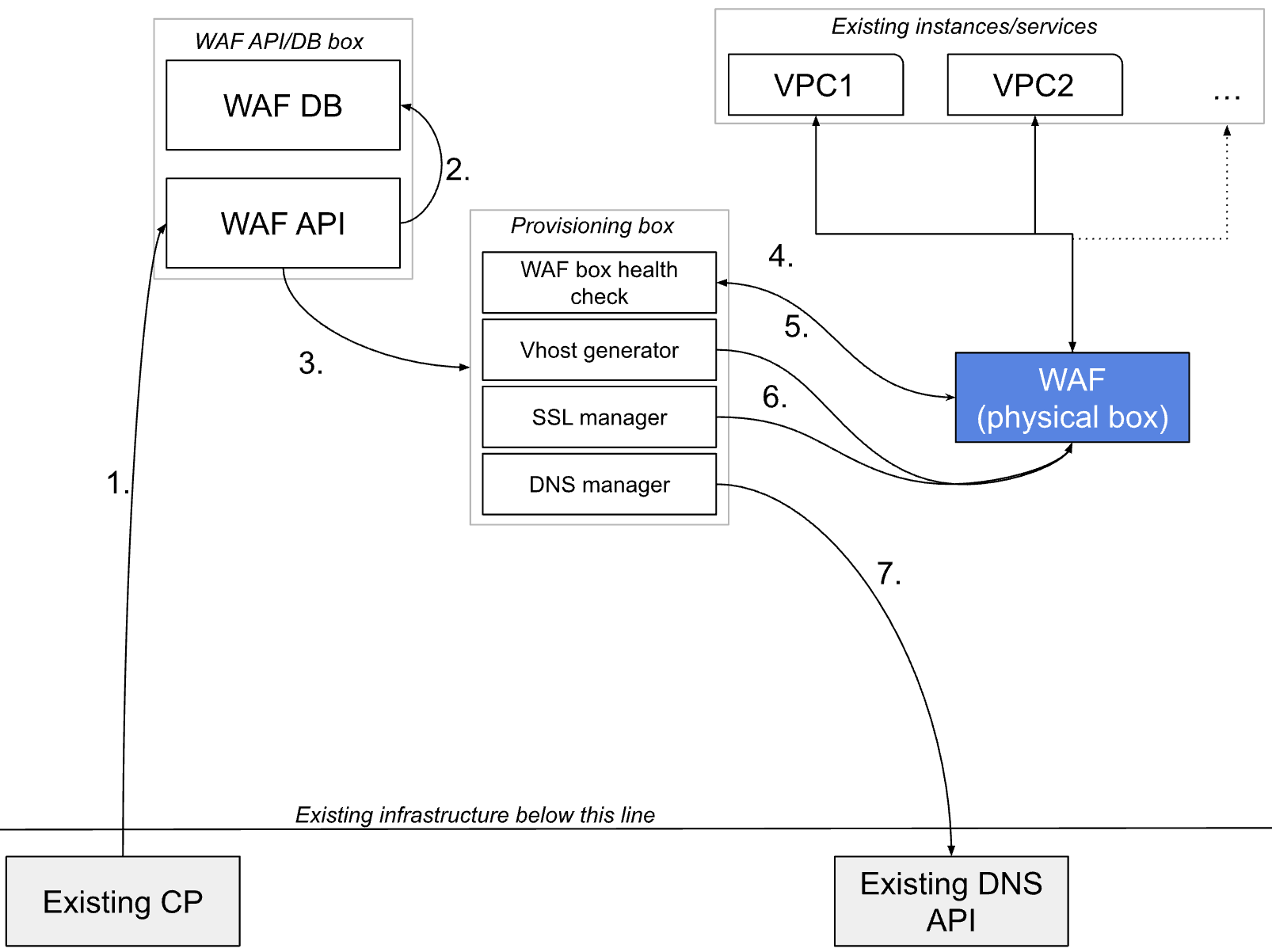
Workflow
- WAF Enablement:
- Triggered via client control panel.
- Sends configuration to WAF API (VPC info, rules, domain settings).
- Provisioning Process:
- WAF server health check.
- vhost generation per VPC/service using custom NGINX configurations.
- Certificate installation (wildcard/shared or custom uploaded).
- DNS redirection to WAF.
- Scaling Logic:
- If the WAF box load exceeds 80%, auto-scale by:
- Deploying a new virtual WAF instance via the OpenStack API, or
- Accepting manually provisioned physical machine details.
- If the WAF box load exceeds 80%, auto-scale by:
- Security & Encryption:
- SSL termination on both public-facing WAF and internal VPC routing.
- Internal hostname-to-IP resolution is enforced by SSL cert validation.
- Option for a dedicated cert per tenant/domain.
- Redundancy & Resilience:
- NGINX-based load balancing.
- WAF API is capable of tracking and orchestrating multi-instance deployment.
Timeline
| Phase | Duration (Approx.) |
|---|---|
| Discovery & Documentation | 2 weeks |
| Platform Engineering | 45 days |
| API & Backend Development | 45 days |
| Security Implementation | 30 days |
| Testing & QA | 30 days |
| Total Duration | ~6 months (incl. overlap) |
Key Deliverables
- Full WAF stack deployed with redundancy and scale-out capability.
- Centralized WAF API with rule management and provisioning hooks.
- Custom vhost generator tied to client VPCs and service endpoints.
- Certificate management system supporting both shared and dedicated SSLs.
- API-driven DNS management integrated with the client’s DNS provider.
- System documentation and handover playbooks.
WAF System Control Blueprint
Client enabling WAF on the account XYZ
Existing CP will initiate the call to the WAF API, sending instructions regarding the settings needed on the account for which the WAF is enabled:
- Account id
- VPC or list of VPCs to be protected (for each, there will be a separate vhost on WAF box) <- their hostnames and internal IP addresses
- Rules to be applied to each vhost separately (each vhost will serve to protect a separate VPC or service with its own rules – unless default ones are only being used)
Example JSON object:
{
  "account_id": 1,
  "backend": [
    {
      "identifier": "11.12.13.14",
      "hostname": "vpc1",
      "status": "default",
      "customrules": {
        "xyz": 123,
        "yzx": 321
      }
    },
    {
      "identifier": "12.13.14.15",
      "hostname": "vpc2",
      "status": "default",
      "customrules": {
        "xyz": 123,
        "yzx": 321
      }
    },
    {
      "identifier": "13.14.15.16",
      "hostname": "vpc3",
      "status": "default",
      "customrules": {
        "xyz": 123,
        "yzx": 321
      }
    }
  ]
}
Settings for this particular client are saved in the DB
This is then saved in the database so we have a reference to what rules were applied to which vhost/VPC.
The database structure will be defined later when we foresee all functions and variables in the provisioning and deployment processes.
Instructions for enabling the WAF are being sent to the Provisioning box
A provisioning box is a virtual server (not necessarily a physical machine) that is responsible for executing a few important functions:
- Checking the WAF server health
- Deploying vhosts on the WAF server
- Installs SSL support
- Updates the DNS as a final step in the process of enabling WAF on a VPC
Checking the WAF server health
We are making sure that monitoring of the WAF box tells us on time when to start provisioning a new WAF server if the traffic or load on the server itself indicates the requirement of a new instance. This is something that should start firing at approximately 80% of the box usage on average daily.
If the server is overloaded
We deploy a new WAF server <- this process will depend on the client’s operations team and their decision to either use a virtual server for WAF box purposes or a physical machine.
Physical machine scenario:
The client’s operations team needs to manually deploy a new server and provide the IP address and hostname details to the WAF API system.
NOTE: We need to prepare the mechanism of allowing API calls to the WAF API that will accept details for every newly provisioned physical WAF server, because the WAF provisioning box will use it to deploy all its necessary capabilities.
Virtual server scenario:
We will send an API request to the client’s API (API that triggers multiple backend services, including OpenStack – further called OpSt) and request that OpSt deploy a new WAF server according to an image that we will create for this purpose at the beginning of the project deployment.
The call itself needs to tell OpSt at least a location and an image to be used for a new instance deployment.
If the server is not overloaded
We continue to the next step: Generating vhosts on the WAF box:
Generating vhost files on the WAF box
The vhost file on the WAF box will contain settings required for traffic to be routed through WAF (nginx WAF) to the VPC originally being directly accessed. In order to do this, we are required to define a few parameters that will tell Nginx how to behave with the traffic it is supposed to be protecting.
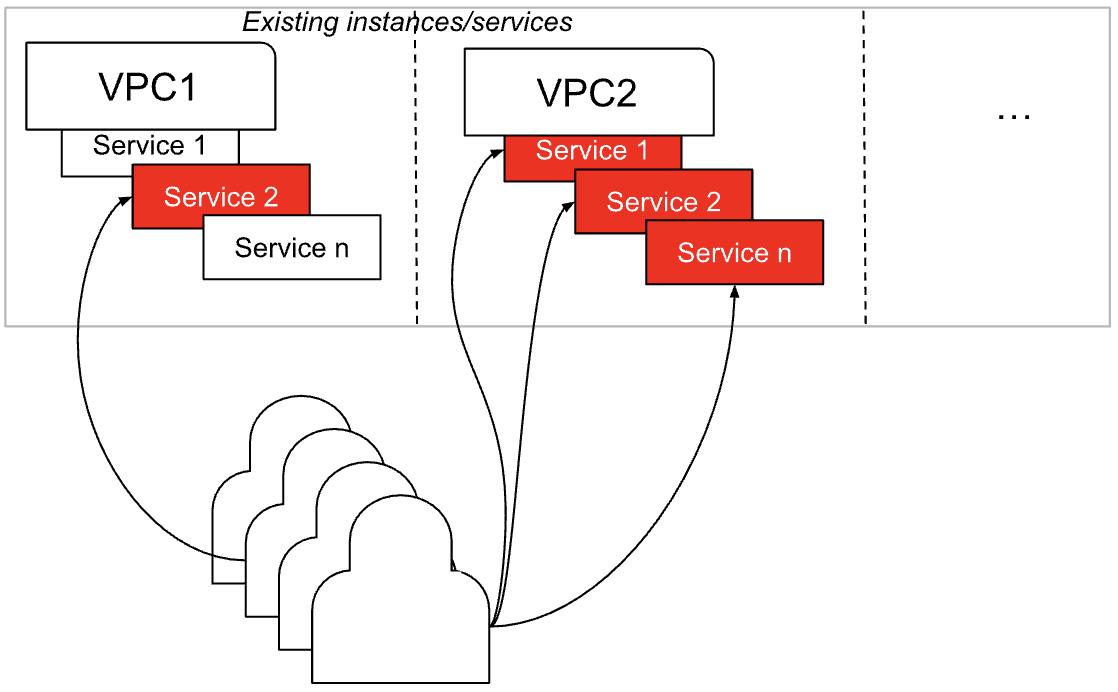
Let’s first draw a simple example of how the current cloud infrastructure is accessed:
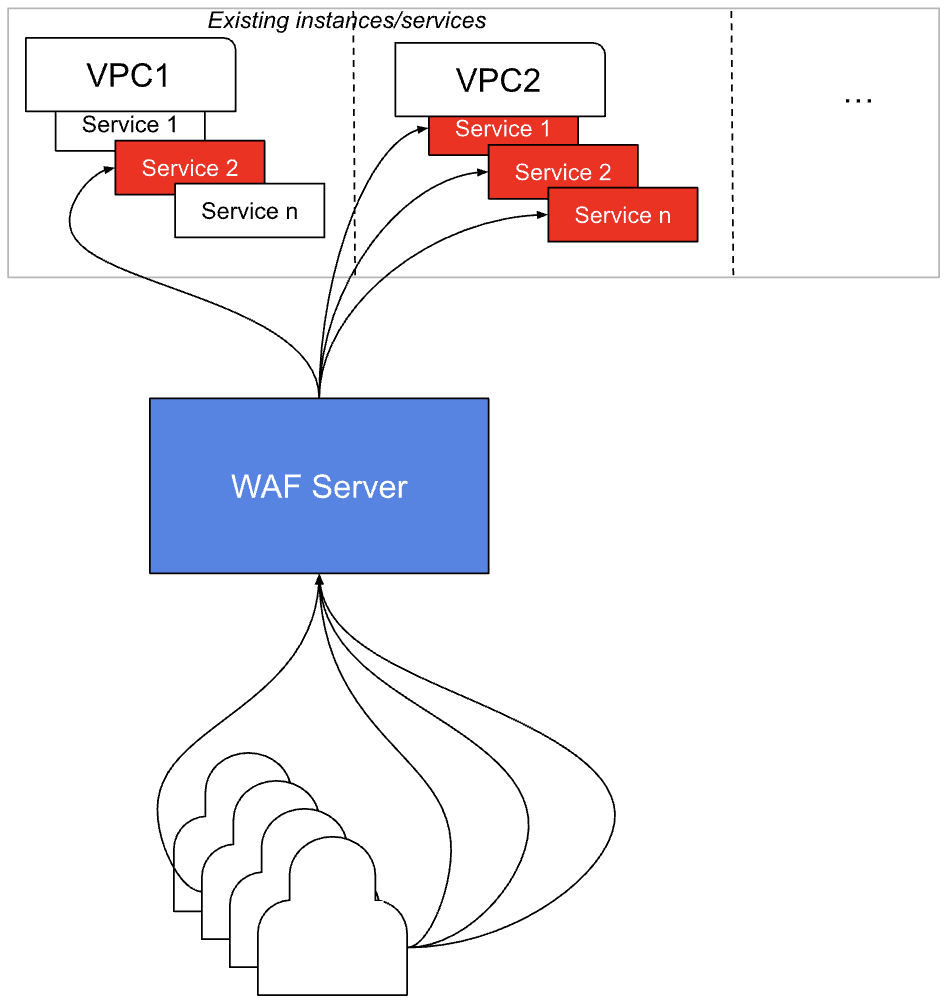
What we want to do is have a WAF box in the middle between users (malicious or non-malicious) to prevent malicious attempts:
Pretty simple. Now, to understand the vhost role, let’s dive deeper into what’s going on at the Nginx level:
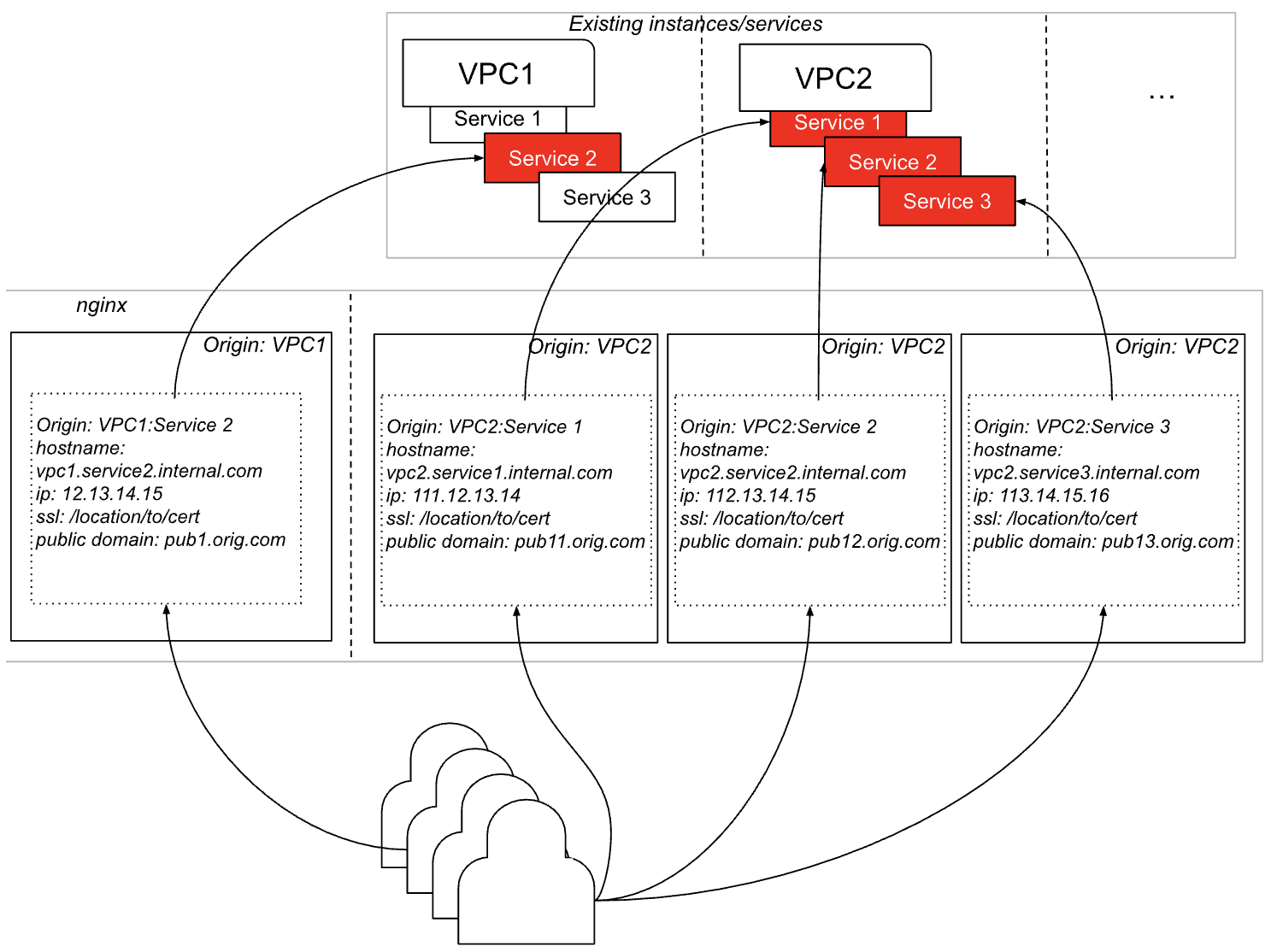
And this is how this further translates to vhost directives with WAF enabled:
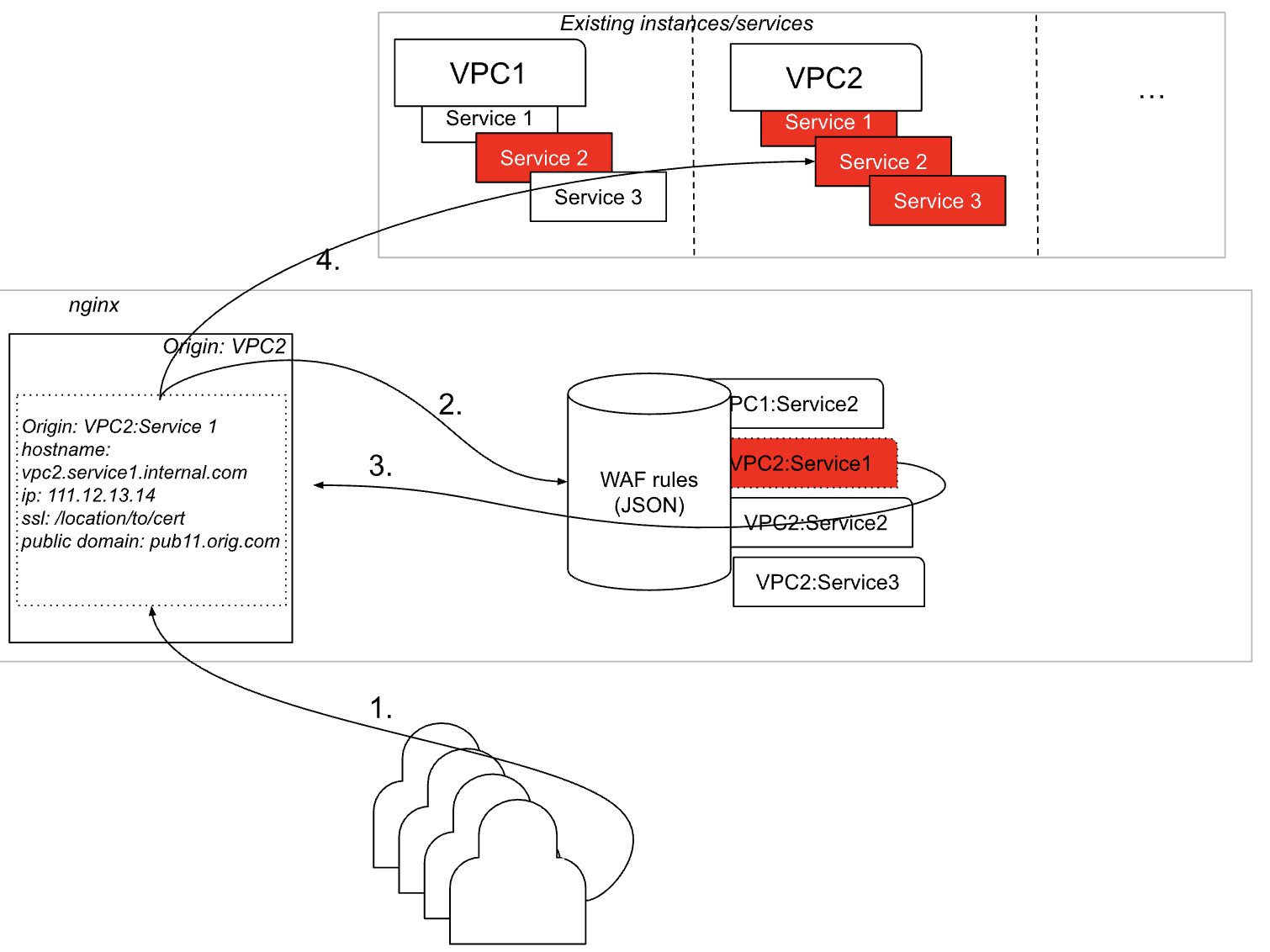
- End-user request initiated
- Vhost is used by nginx to load appropriate WAF rules from the local database in JSON format
- Request approved (if it wasn’t a malicious request)
- Request routed back to the requested VPC/Service
Now, these graphs were necessary in order to understand the next few steps, which are crucial as they are:
- Installing certificate
- Updating DNS records
In order to do that, we have to move the public domain end users who used to access VPC from VPC to WAF (because now WAF will serve as an access point to VPC). So:
- The vhost will contain a listen directive with the value of the domain end users previously used for VPC, then
- The certificate needs to be installed or copied from VPC to WAF so that https connections to WAF work properly, then
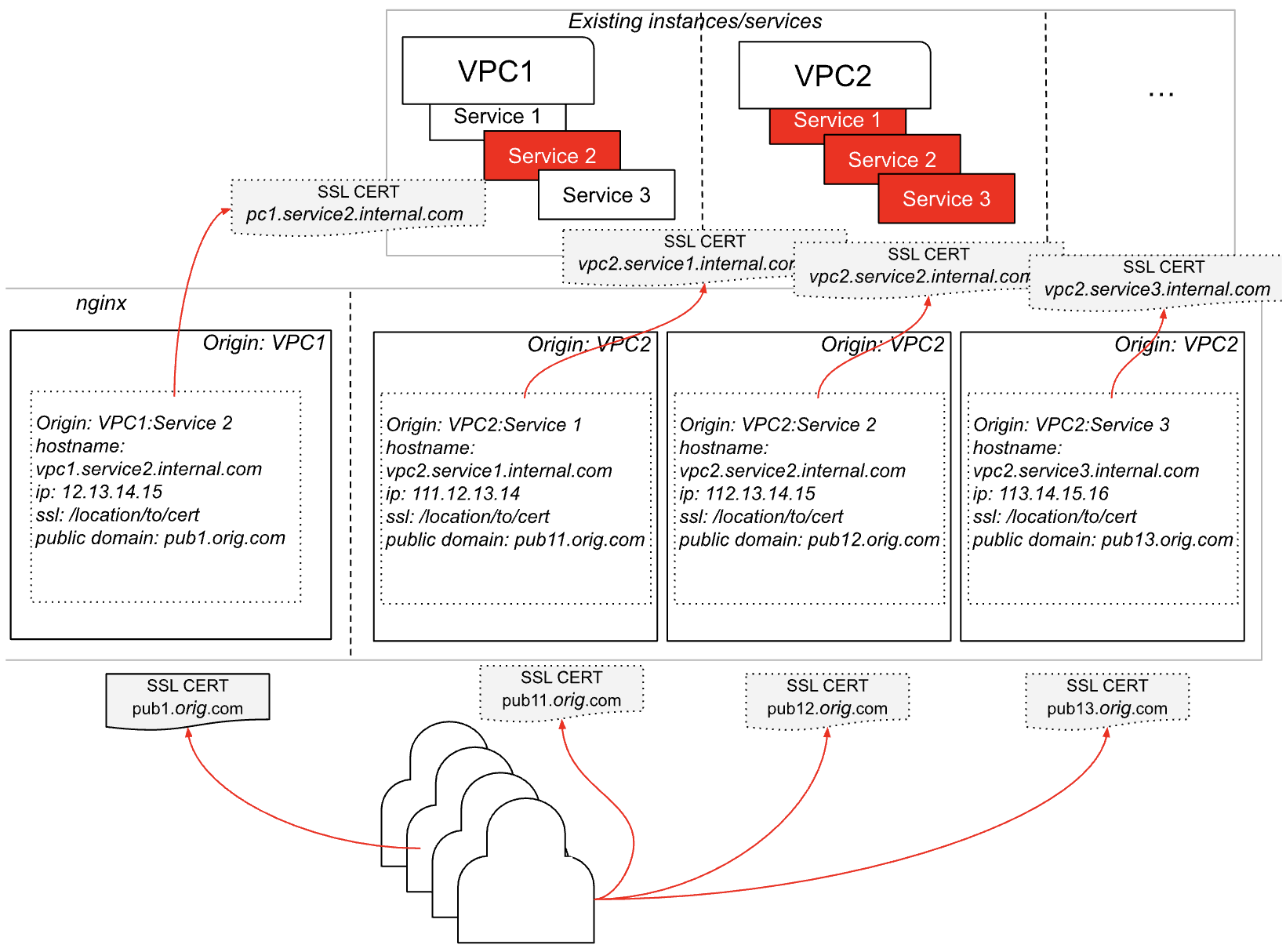
Install a certificate on the WAF box for connecting to the backend (VPCs) using internal hostnames. This certificate can be shared or dedicated (depending on the client’s decision). This means each VPC/Service in the back has to be represented by an internal hostname and internal IP address (not open to the public).
Installing SSL support
When we put the WAF between users and VPC, we need to make sure that no public traffic goes through the WAF instead of directly to VPC. Thus, the DNS update is needed; however, before we do that, let’s first ensure SSL is set and ready to receive live traffic:
- If a client decides to have shared SSL as an option for their end users, they need to generate one certificate for *.orig.com So we can use it on all accounts by default – unless the customer wants to install a dedicated one
- If the customer has the option to implement their own custom domain for VPC and a custom dedicated SSL certificate, we will have a backend sub-provisioning system that would update the vhost on WAF server/s so it gets new to listen to value (for their custom domain) and for a new path to the SSL certificate (the one they will upload thorough control panel).
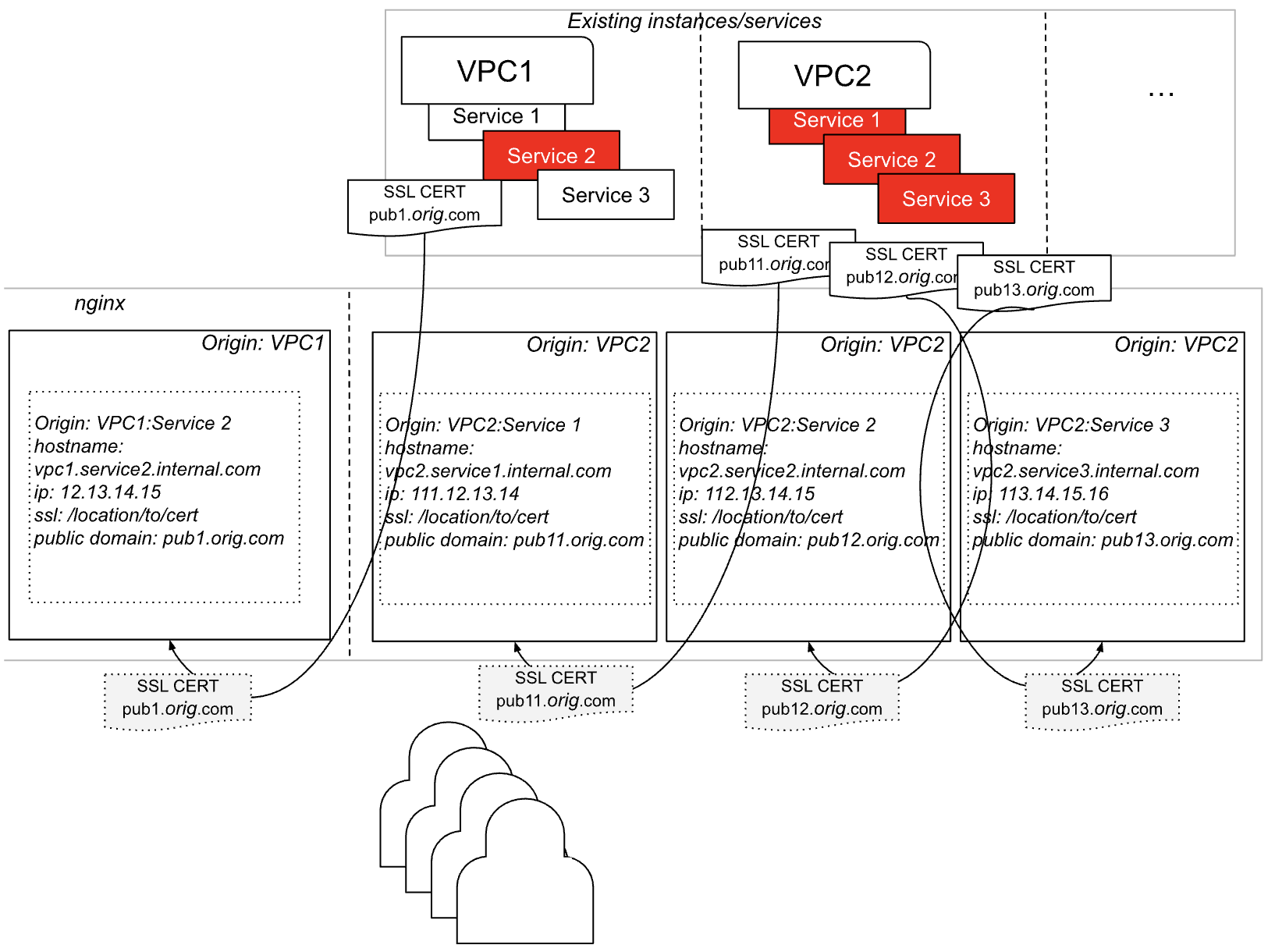
- When we install an SSL certificate on the WAF front-end side (public-facing), we need to make sure that backend connections (to VPCs and services we are protecting with WAF) also have a certificate covering internal hostnames (example:
vpc2.internal.service2.com). Why: so that the WAF server can connect to the backend services it is protecting via HTTPS.
Let’s use the above examples and show step 1 in this process:
Now, step 2 is to ensure internal communication between WAF and backend services is encrypted by installing certificates for each VPC in the backend:
Updating DNS records
What we have done so far:
- Confirmed that the WAF server can take on more connections and that it is healthy in general or we have generated a new instance to help with the new traffic load
- We have generated vhost files for nginx installed on the WAF box to ensure our WAF instance will listen for the traffic previously meant for VPC in the back and pass the traffic back to protected services, IF requests meet the WAF rules
- We have installed SSL support by moving certificates from VPCs to WAF, so it handles HTTPS requests as they come in through WAF
- We have installed certificates to handle HTTPS traffic between WAF and protected services.
Finally, we need to update the DNS so that all of this starts working. Our WAF API will initiate (after all the above items have passed the configuration test) the request to the client’s DNS API and ensure that public domains used to access the VPC are now pointing to the IP address of the WAF server. This way, the traffic for end users will be directed through WAF instead of VPC.
Immediately after that nginx vhosts reload is initiated so that all previous changes take effect.
NOTES:
- WAF box must have redundancy! LB in front and two boxes in the back. LB can also be handled using nginx, which will balance the traffic to both boxes until one of them goes down. To do this, we will use the “backend” directive in the nginx server scope to define all WAF servers to which the traffic needs to be balanced.
- The WAF image must be created for the purpose of generating new WAF instances as needed.
- The client needs to decide if they will use shared SSL between WAF and backend servers/services.
- Dedicated SSL support must be defined
- WAF API needs to have an updated certificate endpoint, install a shared certificate endpoint, and delete the certificate endpoint
- Upon global DNS propagation is completed, we need to lock the public accessibility of the VPCs and allow only WAF to access VPCs, but not before global DNS propagation is confirmed!
- There will be a discrepancy in time between the nginx reload to effect the vhost changes and DNS propagation, meaning some users will receive errors trying to establish the connection with VPC because the DNS still points to VPC, but the vhost is changed, so it takes connections only from WAF.
Recommendation: Keep both listen values so that non-propagated DNS takes users to a usable service. Upon global DNS propagation confirmation, we can remove double listen values.
Results
- Successfully integrated WAF across multiple VPCs and geo-locations.
- Reduced manual WAF provisioning time to near-zero via API automation.
- Client can now securely expose cloud services to public users without compromising backend integrity.
- The platform is ready for horizontal scale with both virtual and physical WAF nodes.
Confidentiality Note
This case study has been anonymized in accordance with project confidentiality. All technical implementation and project management were carried out by BlueGrid.io, ensuring strict adherence to client NDAs and information handling protocols.