Post by
 This is the high-level overview of the SAS Azure Deployment case study. For a full technical breakdown of the architecture, storage design, SAS configuration, and backup strategy, see the detailed case study.
Background
Our client is an analytics firm with a team of 12 analysts whose daily work depends on SAS 9.4, one of the more demanding analytics platforms in terms of raw infrastructure requirements. When BlueGrid.io took over as their IT partner, the client wanted full ownership and control over their environment, and the existing setup was no longer fit for purpose.
The Problem
The client needed a dedicated IT partner to take ownership of their infrastructure and move it forward. The existing environment, a single Windows server accessed via RDP, had accumulated certain improvement action items over time: SAS processing performance under load needed a boost, security controls needed to be upgraded for the sensitivity of the work, a disaster recovery plan was needed, and the path to scale as the team and data volumes grew.
What We Did
BlueGrid.io redesigned the environment from the ground up on Microsoft Azure, with storage performance as the central design constraint. Every architectural decision was made around how SAS actually behaves under load.
Compute was built on an Azure Standard_L16s_v4 virtual machine, part of Azure’s storage-optimized L-series, running 16 vCPUs and 128 GB of RAM. This instance type was selected specifically for its high disk throughput and low latency characteristics.
Storage was separated into three dedicated layers. Persistent analytical data lives on a Premium SSD v2 storage pool delivering 20,000 IOPS and 1,200 MB/s of aggregate throughput. Temporary SAS processing, the layer responsible for sorting, joins, and intermediate datasets during job execution, was moved to local NVMe storage capable of up to 1,100,000 read IOPS and 6,000 MB/s read throughput. This directly addressed the primary bottleneck in the old environment. A third utility partition handles spillover processing, also on NVMe.
SAS 9.4 was deployed using a single-server architecture with a centralized configuration file ensuring all analysts run identical, optimized settings. Per-session memory and CPU usage were capped to maintain stable concurrent performance across the team.
Identity management was centralized through Microsoft Entra Domain Services, allowing cloud-based user accounts to authenticate to the environment without separate local credentials. Two access groups were defined: standard analysts and administrators.
A three-layer backup strategy was implemented to meet a Recovery Point Objective of under 24 hours and a Recovery Time Objective of under 1 hour. The analytical data partition is backed up to cloud storage every 3 hours with ransomware protection enabled. A structured retention policy covers daily, weekly, monthly, and yearly restore points. A local NAS in RAID 10 configuration synchronizes daily from the cloud, ensuring the team can continue working even during internet or cloud service disruptions.
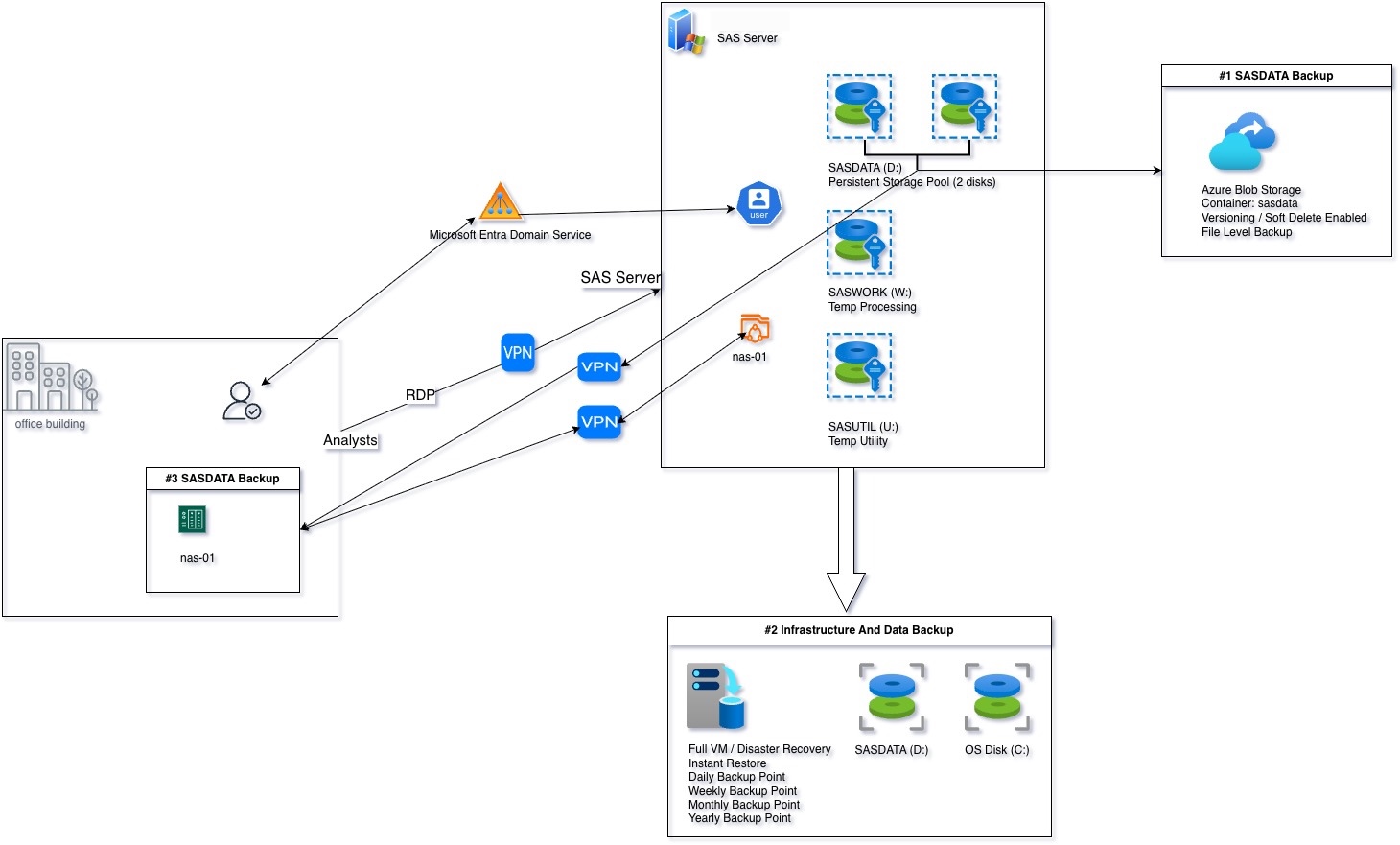
SAS Azure Deployment Diagram
Results
The more data used, the better the performance is!
Processing times dropped significantly across all tested workloads. A 150 million record dataset that previously took 27 minutes ran in 16, a 41% improvement. A 600 million record dataset dropped from 127 minutes to 65, a 49% improvement. Sorting operations improved by roughly 4x.
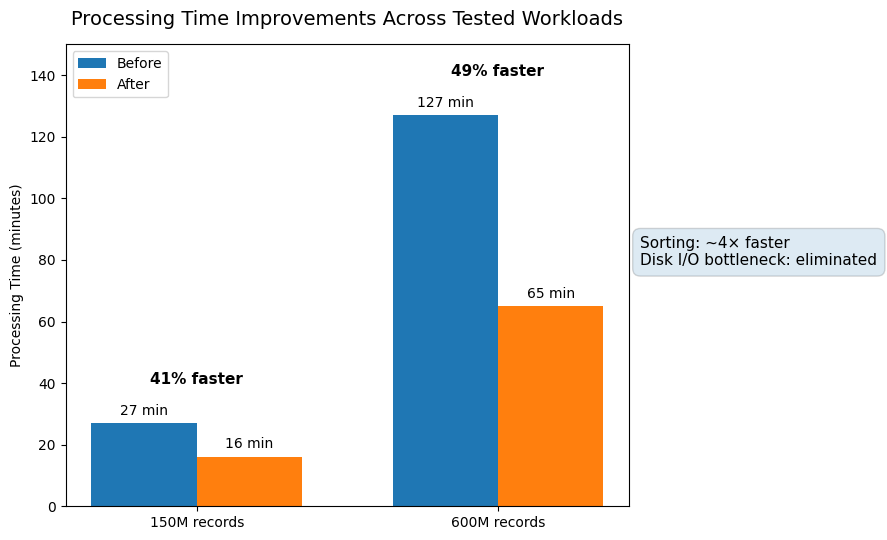
The most significant improvements were observed in I/O-intensive operations: sorting operations improved by approximately 4x (390% to 450% faster), data aggregation steps improved by up to 200%, and read/write operations showed consistent improvements across all workloads. These results confirm that the primary bottleneck in the previous environment, disk I/O, was effectively eliminated.
This is part one of a two-part case study. Part two covers endpoint management and security across the full device fleet: [Part 2: Endpoint Management and Security]
For a full technical breakdown of the architecture, storage design, SAS configuration, and backup strategy, see the detailed case study.