Post by
HR Documents Automation Project Overview
- Scope: all HR documents automation processes the Client produces for its employees, automated on one shared engine
- Infrastructure: deployed on the Client’s AWS environment, with model inference on Amazon Bedrock, used through the Claude Agent SDK and Claude Code
- Integrations: Google Drive for templates and documents, Slack and web app for users, IP allowlist for network access
- Labor law: localized to the Client’s local law, Serbian labor law in this case
- Status: live and in daily use
- Result: document preparation of 8 to 12 hours a week, depending on volume, reduced to about 10 minutes
The challenge
The Client produces the full set of employment documents for every employee it hires, changes, and offboards, exactly as an employer would for its own staff. Each set contains between 2 and 10 legal documents with dozens of placeholders. The same fact, such as a name, a date, or an address, appears under different names in different documents, and the data involved is highly sensitive: national ID numbers, home addresses, salaries, bank details, and device identifiers.
Preparing these sets by copy and paste took between 8 and 12 hours a week, depending on volume. The Client needed that time back, and it set the conditions for the solution:
- Personal data must not reach the AI model beyond what is strictly needed.
- Inference had to run inside the Client’s own AWS environment.
- Templates change with every legal update, so nothing about the templates could be hardcoded.
- A person must approve every document set before it exists.
- The legal rules had to follow the Client’s local labor law.
What we did
The HR documents automation engagement had two phases.
- Discovery (one week): the Project Manager ran the discovery call with the Client and produced the design of the automation: which processes exist, which documents each one needs, which data goes into them, and who signs off.
- Deployment (one week): the AI engineer integrated that design into the engine and deployed it on the Client’s AWS infrastructure. Customizations to the Client’s templates, companies, and rules were made along the way.
The engine is configured for the Client’s processes, templates, companies, and rules. Changing any of them means editing a definition or a template, not changing code.
The solution: eight HR document automations on one engine
We automated every document process the Client needs:
- Employee onboarding: the full employment document set for a new hire.
- Contractor, B2B: the contract set for a company or sole proprietor.
- Contractor, author work: the author-work contract, with an optional equipment statement.
- Contractor, supplementary work: the supplementary-work contract, between three parties (the employer, the person, and their primary employer).
- Employee addendums: annexes to the employment agreement for address, last name, position, working hours and salary, plus the offer and job description when needed.
- Unpaid leave decision: the employee’s request and the employer’s decision, created together.
- Mutual termination: the agreement, decision, and notice, with optional equipment return and unused-leave compensation documents.
- Resignation by employee: the request, decision, and statement, with the same optional documents.
An HR person opens the assistant in the web app or in Slack and describes what is needed in plain language, for example, “annex for a salary raise”. The assistant picks the matching automation from the description in each automation’s definition, and asks when the request is vague, such as “contractor”, which could mean B2B or author work.
How a run works
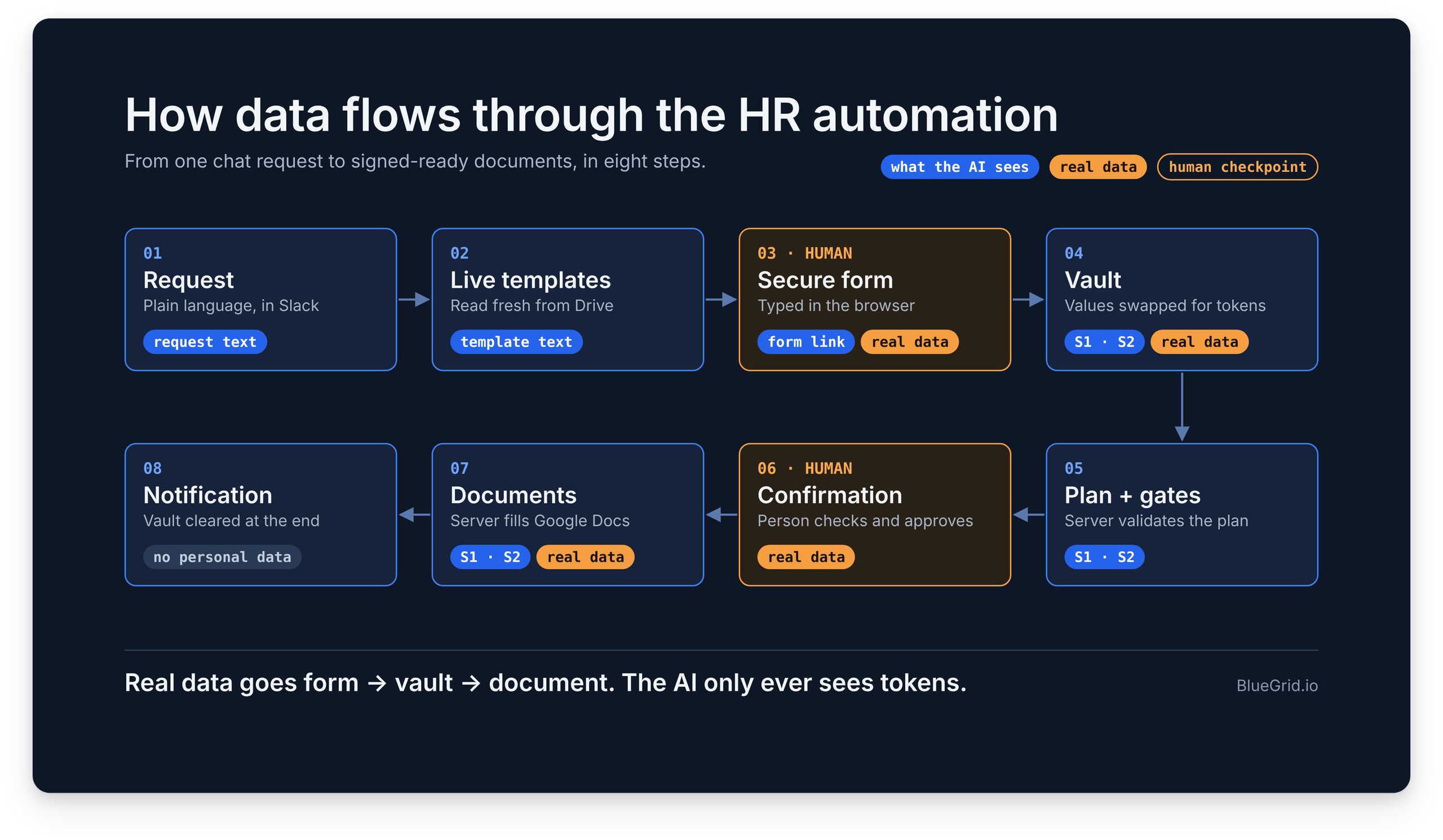
- The assistant reads the current templates from Google Drive at runtime, along with the rules for that automation. There is no index to rebuild: a template edited and approved by a lawyer is used on the next run.
- It sends one numbered message asking for everything that is missing, such as company, signatory, dates, and position.
- Sensitive values are entered in a secure form in the browser, not in chat. Fields are validated by type, including national ID format, tax ID with a check digit warning, registration number, dates, and money.
- The assistant submits a plan. The server refuses it if any placeholder has no value.
- A confirmation page shows the real values and exactly what will be written. A person reviews it and confirms.
- Only then are the documents created, as filled Google Docs copies of the templates in a new Drive folder named after the subject. The assistant returns the links and lists the checkboxes that must be ticked by hand.
- A completion notice goes out by email or Slack to whoever is configured for that automation. It never contains personal data.
Architecture and data protection
The model does the reading and reasoning. The server decides what is allowed to happen.
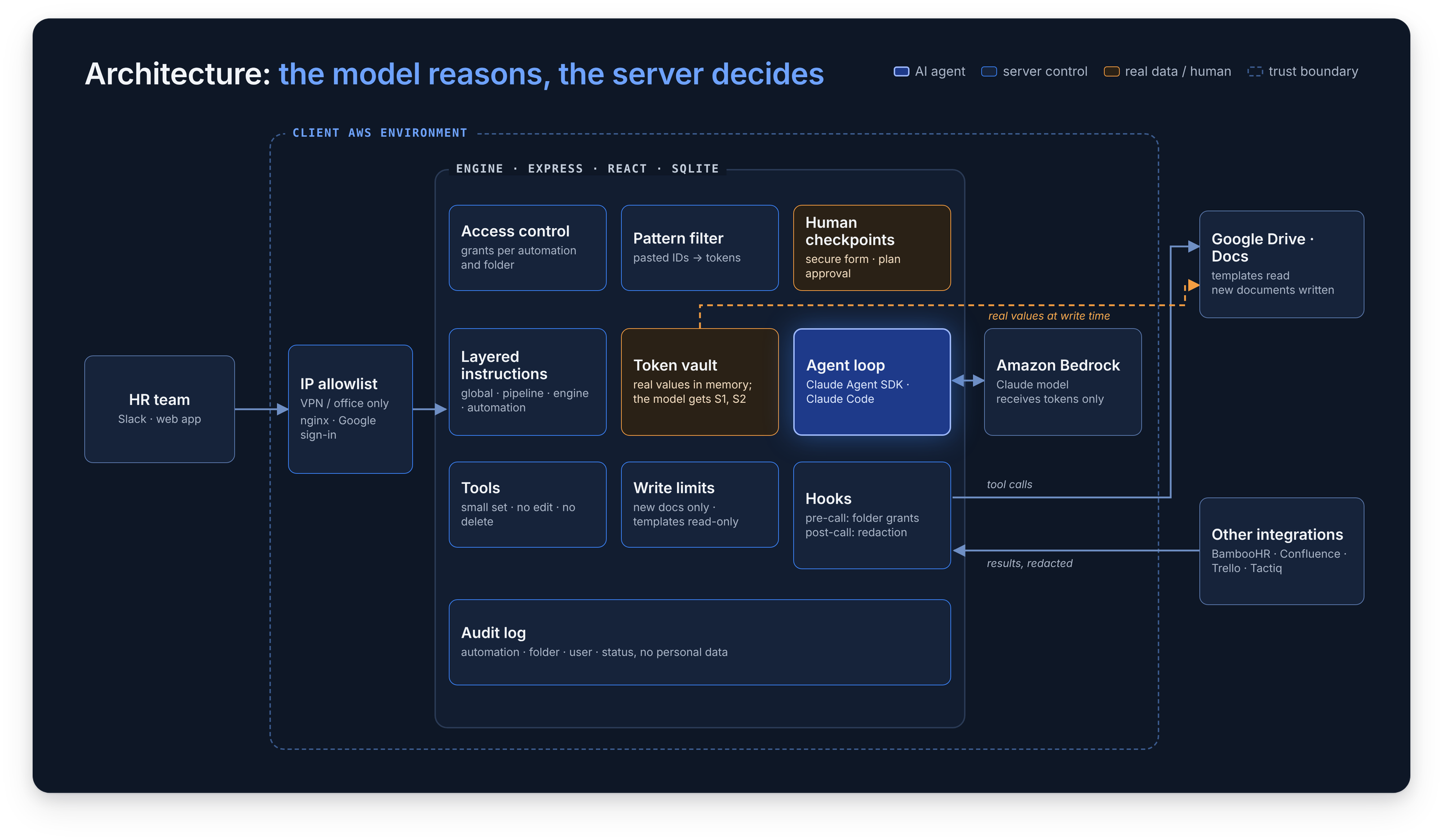
- Inference on Amazon Bedrock inside the Client’s AWS environment, used through the Claude Agent SDK and Claude Code. Each conversation is an agent loop: the model reasons, calls tools, reads the results, and continues. The engine itself is a React front end, and an Express (TypeScript) back end with a SQLite database behind nginx.
- Tokens instead of data. The model receives opaque tokens such as S1 and S2 for sensitive values. A per-conversation, in-memory vault on the server holds the real values and substitutes them only at the moment a document is written. The vault is cleared when the run ends.
- Pattern filter. Typed sensitive values pasted into chat (ID numbers, device IDs, phones, tax IDs, amounts with currency) are caught and replaced with tokens before storage. A plan that contains a typed sensitive-looking value is refused.
- No free-form actions. Each automation exposes a small set of tools to the model. There is no tool to edit a template and no tool to delete anything.
- Layered instructions. Global rules, a pipeline prompt, shared engine rules, and automation-specific rules are loaded at the start of each run, so the rules are always the current version.
- Hooks. A pre-call hook enforces which folders a user’s grant allows. A post-call hook redacts personal data from the results of other integrations before the model sees them.
- Write limits. Writes go only to documents created in the current run. Templates are only read and copied. Existing folders are never overwritten, and corrections create numbered copies.
- IP allowlist. The whole application sits behind an IP allowlist, so it can be reached only from the Client’s approved networks, such as the company VPN or office. The secure form and the confirmation page open only from allowed networks and after login.
- Access control and audit. Sign-in uses Google accounts, and access is granted per automation and per folder. An audit table records each run (automation, folder, user, status) without personal data.
Passports: one record across days and people
Onboarding does not happen in one sitting, and the details arrive from different people on different days. Every person and every company has a passport, a single record shared by all onboarding, offboarding, addendum, and decision automations.
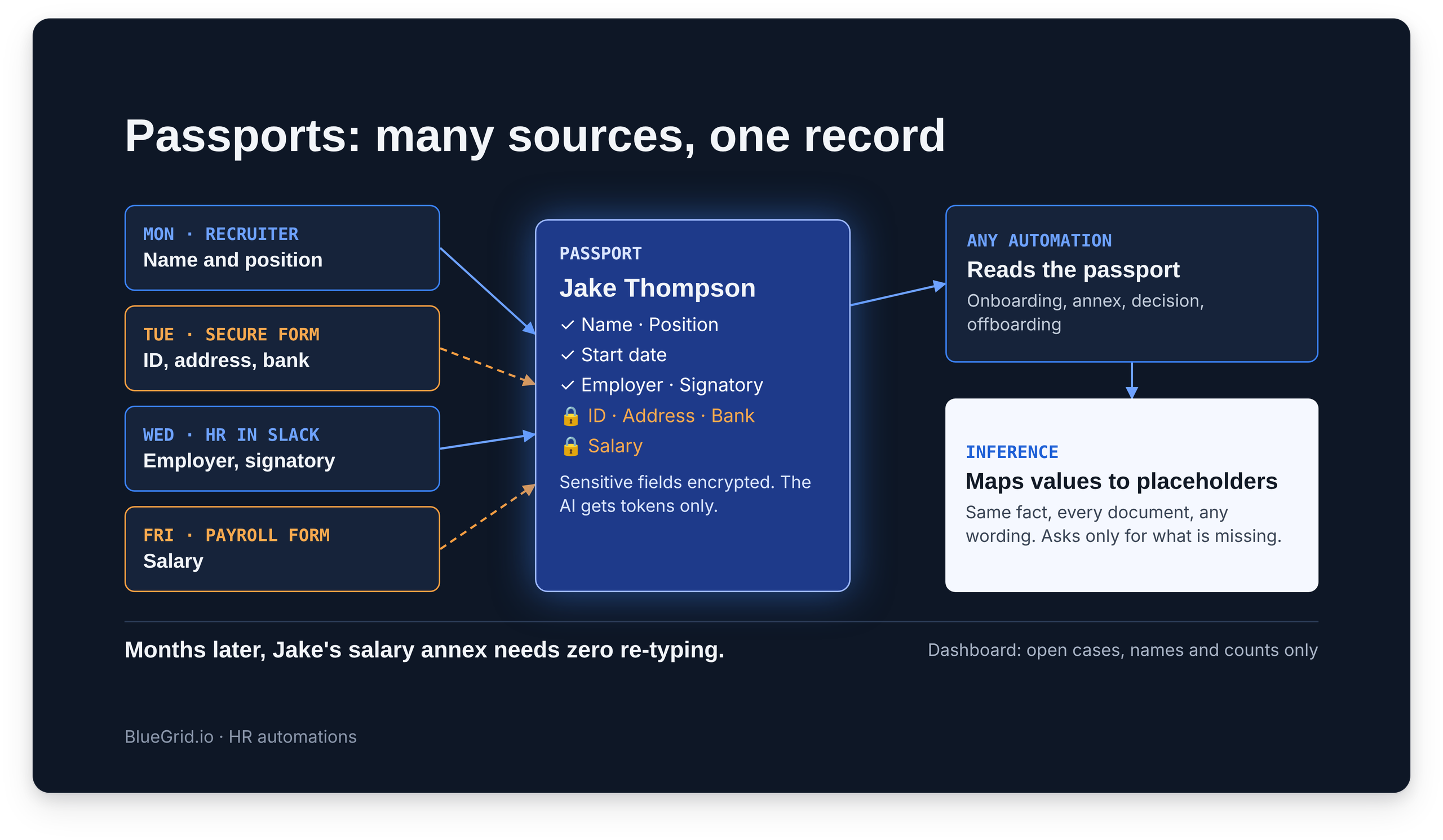
- A passport is created when an automation starts. The assistant first confirms the name in nominative form, exactly as spelled, and the server requires that confirmation. This guards against Serbian declension producing the wrong form of a name.
- Any HR user with access can add details later. Later runs skip what the passport already holds and ask only for what is missing.
- It holds persons and companies, and the data model enforces what each kind may hold. A company record cannot hold a national ID number.
- Sensitive values are encrypted at rest with AES-256-GCM, with the key kept outside the database. Each value is bound to its passport, scope, and field, so it cannot be moved to another record.
- At the end of a process, a person decides whether to keep or delete the passport. The assistant never deletes it.
- A dashboard lists open onboardings, offboardings, addendums and decisions, with who started each one, the last update and what is still missing. It shows names and counts, never sensitive values.
Template handling
- The model maps placeholders by meaning on every run, so a template can change its wording and still work. When the same placeholder appears on lines about different things, the assistant stops and flags a probable template mistake instead of guessing.
- Annexes use one master template that holds every variant with IF and END markers and automatic numbering. The model chooses which blocks to keep, and code deletes the rest, removes the markers, and renumbers the articles. An admin check lints the markers.
- Requirements are declared per automation. For example, a position change requires the job-description document, and a salary change is mirrored in the matching offer wording.
- Offboarding reuses equipment-return and leave-compensation documents from a shared folder.
- Optional equipment lines are deleted only when the user says they do not apply, and never because nothing was provided.
Localization to the Client’s labor law
Legal text lives in the templates, and the rules live in plain-language files per automation. Localizing to a country means supplying that country’s templates and rules. For the Client, this was Serbian labor law and Serbian-language templates. Other jurisdictions and languages follow the same path.
Testing
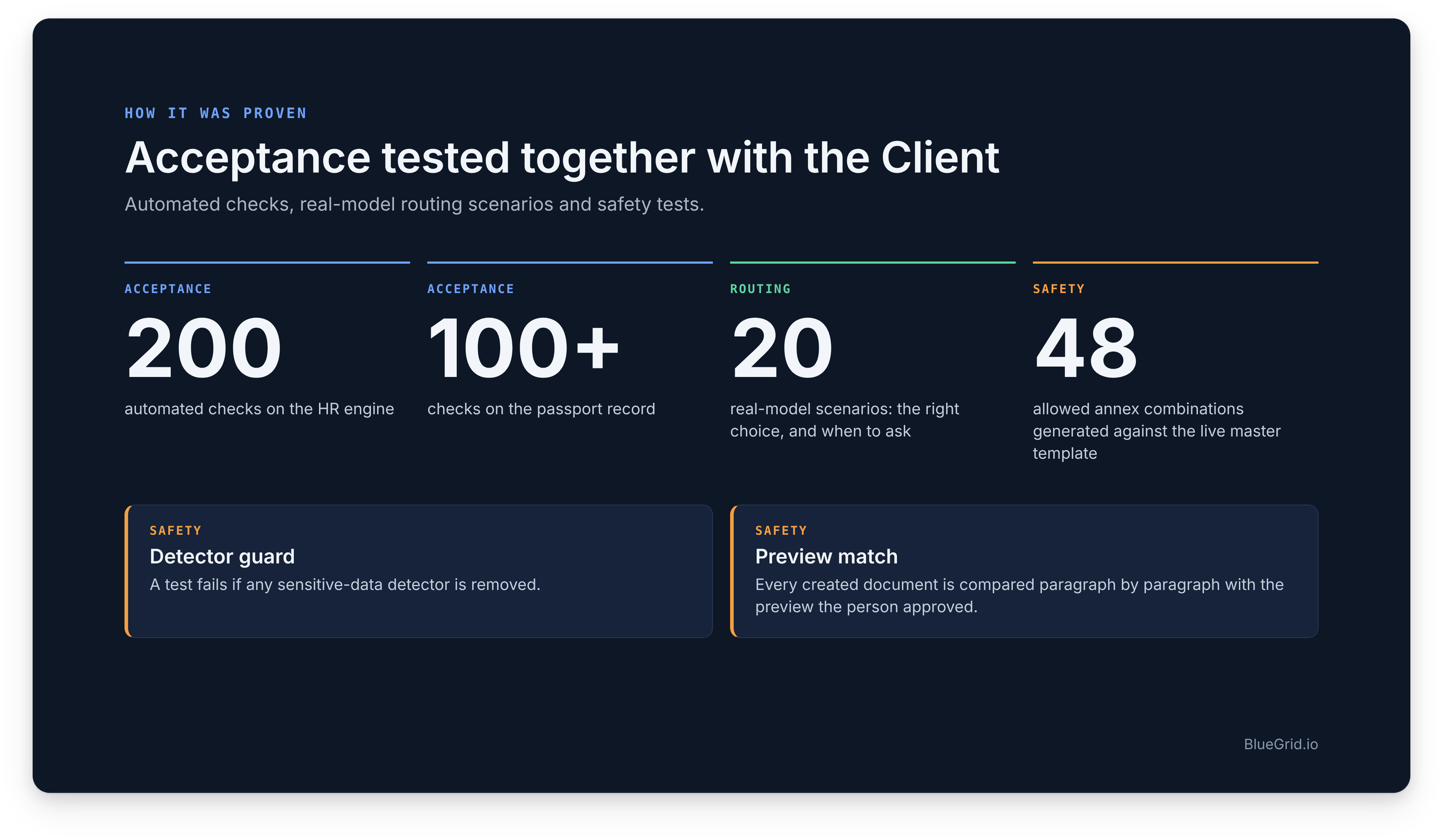
- Acceptance testing was carried out together with the Client: 200 automated checks on the HR engine and more than 100 on the passport record.
- Routing tests with a real model, 20 scenarios, covering both the right choice and when to ask.
- Safety tests: one fails if any sensitive-data detector is removed, created documents are compared paragraph by paragraph with the preview the person approved, and all 48 allowed annex combinations are generated against the live master template.
The result
- Document preparation dropped from 8 to 12 hours a week, depending on volume, to about 10 minutes. The remaining time is the human review we kept on purpose.
- Every document is assembled from the current legal template, and the server checks the required fields before anything is created. A person approves each set before it is written.
- The solution is live and in daily use on the Client’s own AWS infrastructure, behind its IP allowlist.
HR Documents Automation Presentation
Take a look at a general HR documents automation approach with visual representations of the entire process here.
Do you have a high-volume document process?
Employment documents are one example. Any process with repeated documents, sensitive data, and a need for sign-off is a candidate. Book a call with BlueGrid.io, and we will look at your process and tell you whether we can do the same for you.