Post by
  October 13, 2026 |

- What is happening: Microsoft is retiring its own SMS and voice authentication in Entra ID. The cut-off is February 1, 2027 for most users, including internal guests, and July 1, 2027 for Global Administrators and external users.
- What breaks: a user whose only MFA method is SMS or voice will be forced to register a passkey at sign-in. The prompt is blocking, and Microsoft states there is no opt-out from that enforcement.
- What has already happened: since September 1, 2026, users enabled for SMS or voice are automatically being enabled for passkeys, and a Microsoft-managed registration campaign nudges them to register one.
- If you must keep SMS or voice: from October 30, 2026, you can configure a third-party telephony provider through Microsoft Security Store. Microsoft recommends passkeys for everyone else.
- What to do now: find who still depends on SMS or voice, choose a passkey type for each group, plan exceptions on paper, and brief your service desk before the deadline does it for you.
The SMS and voice MFA retirement in Microsoft Entra ID is a change to how every Microsoft 365 user signs in, and it has a fixed date. Microsoft no longer positions SMS and voice as secure authentication methods, and it is making passkeys the default sign-in experience so that every tenant gets phishing-resistant security by default. For a CISO, this is a policy and risk decision with a deadline. For a NOC team, it is a rollout to measure, monitor and support. This article covers both views, and it is written from what Microsoft has published, with the NIST guidance as an independent reference point.
What is changing, and what has already changed
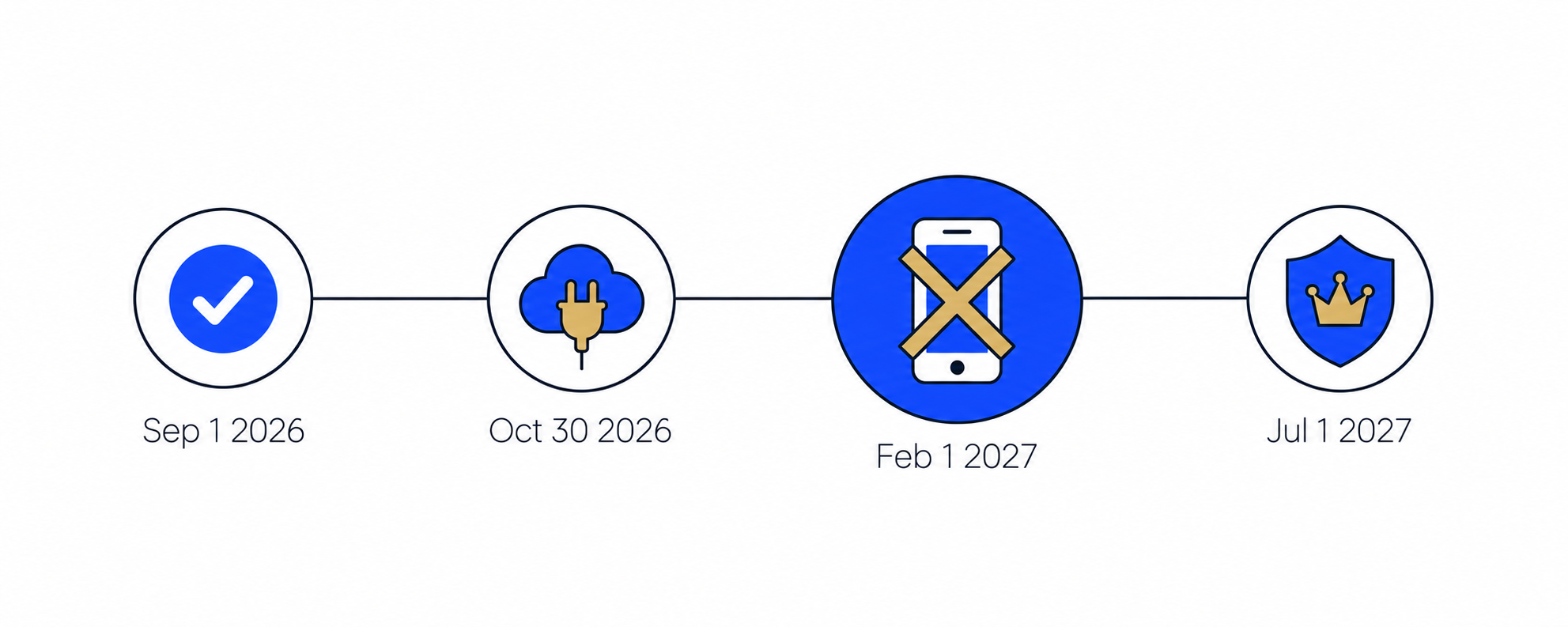
Microsoft’s retirement notice sets four dates. One of them is already behind us, which matters for how you plan.
| Date | What happens | What it means for you |
| September 1, 2026 (passed) | Passkeys become the default sign-in experience. Users enabled for SMS or voice are auto-enabled for passkeys and nudged to register one after they complete MFA. | Your tenant may already be showing prompts. Check what your users and service desk have seen since. |
| October 30, 2026 | Organizations that need SMS or voice can select and configure a third-party telephony provider from Microsoft Security Store. | Start the exceptions review now. The provider route needs a contract and testing time. |
| February 1, 2027 | Microsoft-provided SMS and voice are retired for all users except Global Administrators and external users. Internal guests stay in this February group. | Users whose only MFA method is SMS or voice must register a passkey to sign in. The prompt is blocking. |
| July 1, 2027 | The same retirement applies to Global Administrators and external users. | Plan these two groups separately. They have more time, and they carry the highest risk. |
Three details change how you should plan:
- September 1 is not a future event. Per Microsoft, users enabled for SMS or voice in the Authentication Methods Policy or in legacy MFA settings were placed into a passkey profile that allows all passkey types, and the registration campaign was set to a Microsoft-managed state targeting passkeys. By default, users can snooze that nudge without limit.
- The opt-out is temporary and narrow. Microsoft offers a temporary opt-out from the automatic passkey and registration campaign enablement for the period between September 1, 2026 and February 1, 2027, set through a Microsoft Graph property (passkeyDynamicMigration, currently on the beta endpoint). It does not change enforcement. The standard timelines apply regardless of that setting.
- Guests are split across two dates. Internal guest users follow February 1. External users follow July 1. If partners and contractors sign in to your tenant, you need to know which of the two groups they fall into.
Why SMS and voice are being retired
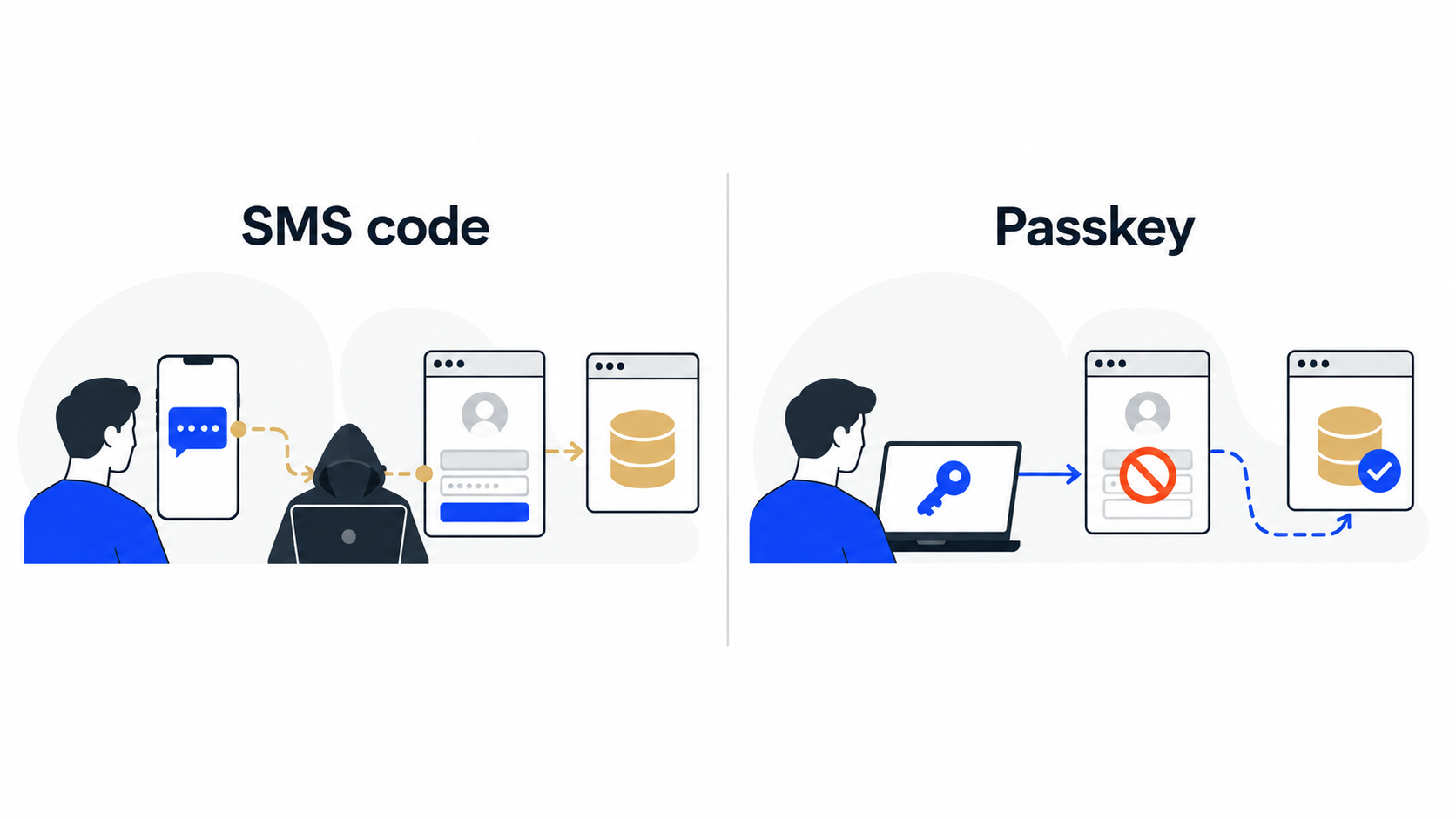
An SMS or voice code proves that someone can read a message sent to a phone number. It does not prove that the person signing in is the legitimate user, and it does not prove that they are on the real sign-in page. Two attack patterns exploit that gap.
- SIM swapping and number takeover. An attacker convinces a carrier to move a victim’s number to a SIM they control, and the codes arrive at the attacker’s phone.
- Real-time phishing and replay. A convincing fake sign-in page asks for the password and then for the one-time code, and passes both to the real service within seconds.
A passkey removes the shared secret from the process. It uses a cryptographic key pair, and the private key stays on the device or in a synced credential store. There is no code to read out, intercept or type into a fake page. Microsoft describes passkeys as resistant to phishing, SIM-swap and replay attacks.
This is not only Microsoft’s view. NIST’s Digital Identity Guidelines (SP 800-63B-4) classify the use of the public switched telephone network for out-of-band authentication, which covers SMS and voice, as a restricted authenticator. At the time of publication, it was the only restricted authenticator. NIST states that an organization accepting a restricted authenticator has to assess and accept the risk, and acknowledge that the risk will likely increase over time. It also advises considering risk indicators such as a SIM change or number porting before sending a code over that channel.
Passkeys in Entra ID: the options in plain terms
Microsoft Entra ID supports two kinds of passkeys. Synced passkeys are saved to a platform credential manager, such as iCloud Keychain or Google Password Manager, and follow the user across devices. Device-bound passkeys are created and stored on one device or key, for example in Microsoft Authenticator, as an Entra passkey on Windows, or on a FIDO2 hardware security key. Users who already sign in with Windows Hello for Business or another phishing-resistant method can keep using it.
| Option | Type | Where it fits | What to decide |
| Passkey in Microsoft Authenticator | Device-bound | Users with a company-managed or enrolled phone | Minimum app versions apply when a profile allows both device-bound and synced passkeys on Authenticator (iOS 6.8.37, Android 6.2507.4749 per Microsoft) |
| FIDO2 security key | Device-bound | Staff without a company smartphone, shared workstations, privileged roles | Purchase, distribution, replacement and loss process |
| Entra passkey on Windows | Device-bound | Users on Windows devices | Which device fleets are eligible |
| Synced passkey (platform credential manager) | Synced | Users who already rely on a platform credential manager | Whether your policy accepts credentials that live in that manager, and for which groups |
Microsoft lets you apply different rules to different groups through passkey profiles. A profile defines whether attestation is enforced, which passkey types are allowed, and which authenticators AAGUID permits. Microsoft’s own example uses device-bound passkeys with attestation enforced for IT admins, executives and engineering, and a more flexible profile with synced and device-bound passkeys for groups such as HR and Sales. Passkeys (FIDO2) are available in all Entra ID editions, including Free, and Microsoft states that no extra licenses are required.
For CISOs: decisions to make now
- Set the target state. Decide which user groups get which passkey type, and where attestation is required. Privileged and high-risk groups are the natural place for device-bound passkeys with attestation, which matches Microsoft’s own example.
- Treat exceptions as a documented exception process. Microsoft’s guidance is to default to passkeys and to keep SMS or voice only for segments with a genuine regulatory or operational need, written down with the applicable regulation or scenario. Know the limits of the provider route before you commit: it supports one provider per channel (one for SMS, one for voice), it is available for Entra ID only (not Entra External ID or Azure AD B2C), and it does not keep SMS sign-in alive as a primary authentication method. Your organization owns the provider relationship, including message delivery issues, and the integration uses a routing function deployed in your Azure subscription.
- Decide whether to move administrators early. The July 1, 2027 date gives Global Administrators more time. They are also the accounts where phishable MFA hurts most, so moving them in the first wave is a risk decision you can make before Microsoft makes it for you.
- Consider enforcing passkeys where it matters. Microsoft lists Conditional Access authentication strength as an optional way to require passkeys for sensitive resources.
- Choose the metrics you will report. Useful ones are the number of users with SMS or voice as their only method, the share registered with a phishing-resistant method, and the number of open exceptions. Review them every week until February 1.
- Check your own obligations. If a framework or customer contract mentions out-of-band authentication, confirm what it requires. The NIST restricted status above is a reference point, and your own regimes decide what applies to you.
For NOC teams: what to run, watch and prepare
The NOC owns the part that decides whether February 1 is quiet: visibility and support. A practical set of tasks:
- Build the inventory. Microsoft publishes a PowerShell script that lists users enabled for SMS or voice. It needs one of the Global Reader, Authentication Policy Administrator, or Security Reader roles. Put the result into a security group, because Microsoft recommends scoping both the registration campaign and the user communications to that group.
- Track registration, not only sign-ins. Use the Entra authentication methods activity report and your sign-in logs to follow how many users have registered a passkey each week, and which users are still SMS-only.
- Prepare the service desk runbook. Cover at least: lost or replaced phone, new device, user with no eligible device, traveler without their usual device, new hire after the deadline, and external users who cannot register. Decide in advance how you verify identity before resetting or reissuing a passkey, because that recovery path becomes part of your security.
- Plan the cutover days. Staff a visible channel for the first days after February 1 and after July 1, and agree who can approve temporary measures.
- Watch what else relies on SMS or voice. Review other places in your tenant and in your processes where a phone number is used for verification, so the change doesn’t surface as a surprise.
A rollout plan from now to February 1
As of mid-October 2026, there are roughly 16 weeks left until February 1. This is one way to use them, and you can adapt it to your size.
| Window | Goal | Actions |
| Now to October 30 | Know your exposure | Run the inventory script, create the SMS and voice security group, review the September 1 auto-enablement, decide on the temporary opt-out if you need it, and list candidate exceptions. |
| From October 30 | Decide on exceptions | Review providers in Microsoft Security Store for segments with a documented need, and start a pilot with evaluation mode, which lets you validate routing without changing what users experience. |
| November | Pilot | Move IT, security, and a friendly business team to passkeys. Collect what the service desk learns and fix the instructions. |
| December to mid-January | Waves | Roll out by group with device-specific instructions, a communication plan (awareness, action, reminder), and weekly reporting. |
| Late January | Stragglers | Contact each remaining SMS-only user personally, close or approve exceptions, and confirm the service desk is ready. |
| February 1 | Cutover | Watch sign-in failures and registrations closely, and handle blocking prompts quickly. |
| February to July 1 | Administrators and external users | Move Global Administrators and external users. If you started them in the first wave, this step is a verification. |
Groups that are easy to miss
- Global Administrators. A later date does not make them lower priority.
- External users and internal guests. They have different dates, and you don’t control their devices.
- Shared or service-style accounts that sign in interactively. Find out which method they use and who holds it.
- Emergency access accounts. Confirm which authentication method they rely on.
- Staff without a company smartphone. Hardware security keys are the usual answer, but they require ordering and distribution lead time.
- Users on devices that cannot register a passkey. Microsoft’s nudges target eligible devices, so some users need a different path.
Common mistakes to avoid
- Treating September 1 as something that is still ahead.
- Assuming the opt-out also covers the February and July enforcement dates. It does not.
- Keeping SMS for everyone through a telephony provider instead of limiting it to documented needs.
- Moving employees and forgetting guests, partners, and administrators.
- Launching a registration campaign before the service desk has a runbook.
- Rolling out passkeys while leaving a weak account recovery process in place. An attacker then targets the recovery path instead.
How BlueGrid.io can help
BlueGrid.io provides managed infrastructure and security services, including NOC and SOC work, so the same team that watches your environment can help you move it. For this migration, we offer:
- Readiness assessment. We analyze your Entra ID tenant and show which users, administrators, and guests still depend on SMS or voice, and what the September 1 auto-enablement changed.
- Passkey rollout plan. We select the right passkey type for each user group and adjust your authentication methods and Conditional Access policies to match.
- User communication and support. We prepare announcements and device-specific guides, and support users through registration.
- Exceptions handled properly. Where SMS or voice has to stay, we help you document the requirement and evaluate and configure a telephony provider.
- Monitoring to the deadline. We track registration progress and sign-in issues, and report weekly, so February 1 passes without surprises.
Sixteen weeks is enough time to do this well and not much more than that. Contact us and we will show you where your tenant stands.
Frequently asked questions about the SMS and voice MFA retirement
- Are we affected? If any user is enabled for SMS or voice in your authentication methods policy or legacy MFA settings, yes. Run Microsoft’s script to see exactly who.
- Will users be locked out if they have the Authenticator app as well as SMS? Microsoft’s enforcement applies to users whose only available MFA method is SMS or voice. Users with another method are not forced into the blocking registration prompt by that rule.
- Can we delay? You can temporarily opt out of the automatic passkey and registration campaign enablement until February 1, 2027. You cannot opt out of enforcement on the retirement dates.
- Can a telephony provider keep SMS sign-in as a primary method? No. Microsoft states that SMS sign-in as a primary authentication method is retired even when you use a provider.
- Does the provider option cover Entra External ID and Azure AD B2C? No, it is currently available only for Microsoft Entra ID.
- Do passkeys need extra licenses? Microsoft states that passkeys (FIDO2) are available in all Entra ID editions and that no extra licenses are required.
Sources 🔽
- Microsoft Learn, Passkeys by default and retirement of Microsoft-provided SMS and voice authentication: https://learn.microsoft.com/en-us/entra/identity/authentication/concept-sms-voice-retirement (page last updated 2026-09-23)
- Microsoft Learn, Frequently asked questions about telephony providers in Microsoft Entra ID: https://learn.microsoft.com/en-us/entra/identity/authentication/phone-providers-faq (page last updated 2026-09-21)
- Microsoft Learn, How to enable passkeys (FIDO2) in Microsoft Entra ID: https://learn.microsoft.com/en-us/entra/identity/authentication/how-to-authentication-passkeys-fido2
- NIST SP 800-63B-4, Digital Identity Guidelines, Authentication and Authenticator Management: https://pages.nist.gov/800-63-4/sp800-63b/authenticators/