 Post by
  December 20, 2021 |


Given the modern requirement for lightning-fast, highly responsive, and high availability applications, one of the solutions that Macrometa offers to its clients is a platform for developers. This platform helps them in creating applications with APIs that are fast, contextualized, and hyper-personalized in order to solve these problems.
It handles the distribution of information and allocation of cloud resources while allowing the developers more freedom and time to spend on creating the most efficient software solutions for the benefit of end-users.
In this article, we’ll show how to integrate the Macrometa Cloud Infrastructure API with the NodeJS application.
First, we will create a basic local NodeJS app.
We use the Node Package Manager to initialize our application inside any desired folder:
npm init -yWhen we create the main initial “index.js” file inside that directory where our code will be, inside it, we will need to connect to the online Macrometa infrastructure.
To do this, we need to install “jsC8” which is the JavaScript driver that allows us to use C8 to establish a connection to our local region.
npm install jsc8As with using any API, we need to be able to authenticate ourselves online.
Macrometa allows multiple ways of doing this, one of which is through an API key.
We can create our API key by logging into Macrometa.com, going to “ACCOUNT” and then “API Keys“. Click the button “New API Key” and then create it.
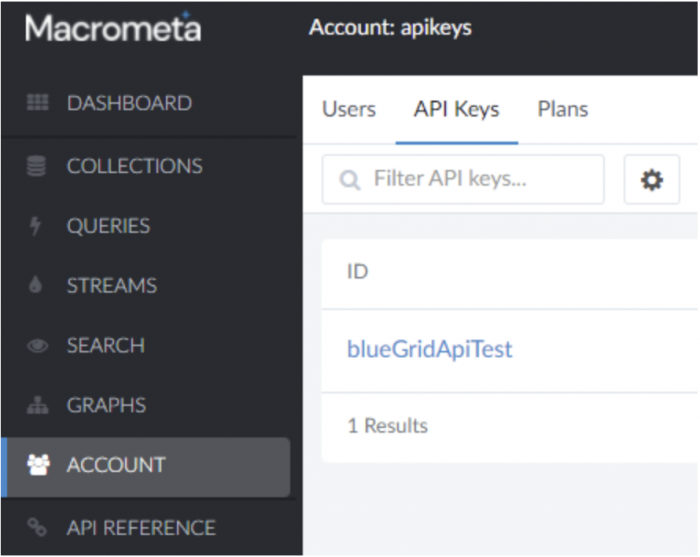
Here Macrometa will showcase your API key which you will have to save somewhere so we can use it later.
Now inside our “index.js” file, after we have obtained our API key and installed the jsC8 module, we need to import its object with:
const jsc8 = require("jsc8");After which we can finally connect to the Macrometa API using:
const client = new jsc8({
  url: "https://gdn.paas.macrometa.io",
  apiKey: "XXXXXXXX"
});
Now we can authenticate ourselves with our new API key before we can start using the many API endpoints inside our project.
How to use the Macrometa database system in your NodeJS project
We will now do some basic operations through the established API endpoint on our online database. That will reside on the Macrometa distributed cloud network.
Firstly we authenticate ourselves and connect to the cloud:
const jsc8 = require("jsc8");

const client = new jsc8({
  url: "https://gdn.paas.macrometa.io",
  apiKey: "XXXXXXXX"
});
And now we are ready to through the operations of:
a) Creating a Collection to store our data in
async function createCollection(collectionName) {
  let collectionDetails;

  try {
    collectionDetails = await
    client.createCollection(collectionName);
  } catch (e) {
    console.log("Collection creation did not succeed due to " + e);
  }

  console.log("Collection " + collectionDetails.name + " created successfully");
}

createCollection("testCollection");
b) Adding data to the newly created collection
async function addData(collectionName) {
  await client.insertDocumentMany(collectionName, [{
    _key: "BlueGrid",
    field1: "BlueGrid",
    field2: "Test1"
  }, {
    _key: "Macrometa",
    field1: "Macrometa",
    field2: "Test2"
  }]);
  await console.log("Data added to collection!");
}

addData("testCollection");
c) Sending a query to, for example, retrieve the data from the collection
async function c8Queries(collectionName) {
  const result = await client.executeQuery(
    "FOR element IN " + collectionName + " RETURN element"
  );
  await console.log(result);
}

c8Queries("testCollection");
Using such queries we are able to do anything we want directly to all of the data in the entire database.
But, there is also the option of using RestQL (Query as API).
That is the recommended option to use through the API which allows the user to set, update and execute named and parameterized C8 queries stored in the Macrometa GDN (Global Data Network).
Here is a quick example of a simple RestQL query creation of a query that counts the number of elements within a collection:
client.createRestql("getCount", "RETURN COUNT(FOR el IN testCollection RETURN 1)", {});And a way to call it later on when required:
client.executeRestql("getCount").then(console.log);Example response:
{
  result: [ 2 ],
  hasMore: false,
  cached: false,
  extra: { warnings: [] },
  error: false,
  code: 201
}
The last important point we should go over is how to get real-time updates from a collection inside the database. First, we need to make sure that a given collection has “Realtime Status” switch enabled, we can toggle that on the “COLLECTIONS” page of the specific collection inside the browser.
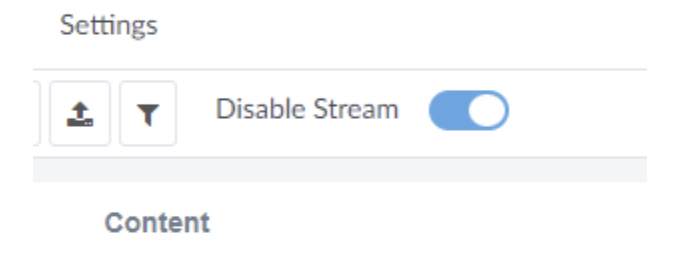
And then we can use this to listen to any changes that happen to that collection globally:
async function callback_fn(collectionName) {
  await console.log("Connection open on " + collectionName);
}

async function realTimeListener(collectionName) {
  const listener = await client.onCollectionChange(collectionName);

  listener.on('message', (msg) => console.log("message=>", msg));
  listener.on('open', () => { callback_fn(collectionName); });
  listener.on('close', () => console.log("connection closed"));
}

realTimeListener("testCollection");
Example response after a collection update:
{
  "messageId": "CN+CYhACIAA=",
  "payload": "eyJfa2V5IjoidGVzdCIsIl9yZXYiOiJfZFg3S2FENi0tXyIsInRlc3RGaWVsZCI6NX0=",
  "properties": {
    "op": "UPDATE",
    "origin-dc": "gdn-eu-central",
    "sid": "2"
  },
  "publishTime": "2021-12-09T13:05:26.924Z",
  "redeliveryCount": 0,
  "eventTime": "2021-12-09T13:05:26.623Z"
}
The changes are inside the “payload” object property encoded in Base64.
How to use Macrometa data Streams
Macrometa streams allow us to capture data in motion. Messages can be sent through those named streams from publishers to consumers who can then execute further logic given those messages.
These messages by publishers are stored once in a stream and can then be consumed as many times as required by the consumers who are subscribed to a given stream.
In the Macrometa documentation you can find more details on this topic and here is the important piece from it:
“The stream processing can be used for:
- Transforming your data from one format to another (e.g., to/from XML, JSON, AVRO, etc.).
- Enriching data received from a specific source by combining it with databases, services, etc., via inline calculations and custom functions.
- Correlating data streams by joining multiple streams to create an aggregate stream.
- Cleaning data by filtering it and by modifying the content (e.g., obfuscating) in messages.
- Deriving insights by identifying interesting patterns and sequences of events in data streams.
- Summarizing data as and when it is generated using temporal windows and incremental time series aggregations.
- Real-time ETL for Collections, tailing files, scraping HTTP Endpoints, etc.
- Streaming Integrations i.e., integrating streaming data as well as trigger actions based on data streams. The action can be a single request to a service or a complex enterprise integration flow.”
We are going to go through the basic steps of setting up a stream, creating a producer and consumer as well as sending a basic message and being able to receive it on the other end.
Inside our main “index.js” file of our NodeJS project, we will create a demo function for our stream test but before that, we still have to authenticate ourselves with the Macrometa servers above as well:
const jsc8 = require("jsc8");

const client = new jsc8({
  url: "https://gdn.paas.macrometa.io",
  apiKey: "XXXXXXXX"
});
After that we can go on and create our function, every important step for using a stream is inside this function, it will first create all the required entities within a stream and then both send, receive and log a simple message inside the console:
// Streams demo
async function streamTest() {

  await client.createStream("newStream", false);

  const consumer = await client.createStreamReader("newStream", "my-sub");
  const producer = await client.createStreamProducer("newStream");

  consumer.on("message", (msg) => {
    const { payload, messageId } = JSON.parse(msg);
    // logging received message payload(ASCII encoded) to decode use atob()
    console.log(atob(payload));
    // Send message acknowledgement
    consumer.send(JSON.stringify({ messageId }));
  });

  producer.on("open", () => {
    const message = "BlueGrid and Macrometa Test";
    const payloadObj = { payload: Buffer.from(message).toString("base64") };
    producer.send(JSON.stringify(payloadObj));
  });

}

streamTest();
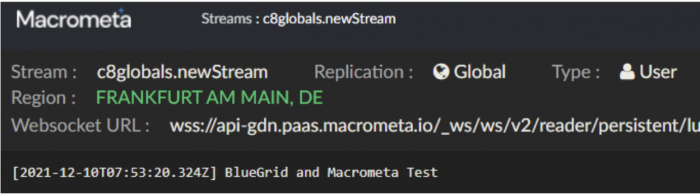
Alongside logging the message and using the data wherever you need, Macrometa also offers you to see these messages being received in real-time online on their website.
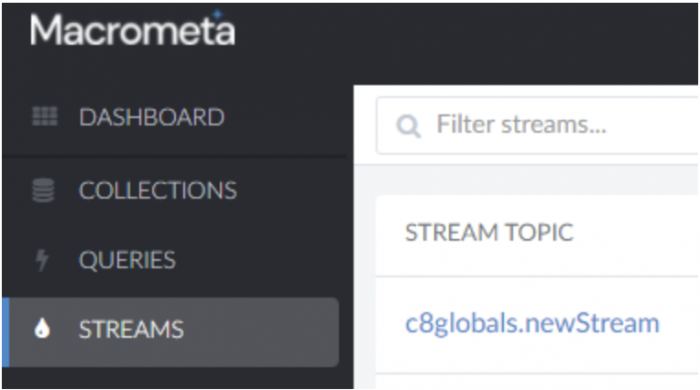
You can do that by going to Macrometa.com, logging in and then going to “STREAMS“. There you can click on our newly created stream we have and you can try sending the message again through your code and you will receive that message inside the browser window to see as well:
That’s it, that’s all 😁 Follow our other articles for more information and knowledge we are eagerly sharing!

