Post by
 November 6, 2026 |


At a glance
- Challenge: every hire, contractor, contract change, and departure needs a set of 2 to 10 legal documents, each with dozens of placeholders and highly sensitive personal data.
- Solution: an AI assistant that reads the live legal templates, asks for what is missing, and builds the documents only after a person has approved them. Personal data never reaches the AI model.
- Result: about 12 hours a week of document preparation reduced to about 10 minutes (BlueGrid.io internal figures).
- Scope: eight HR automations covering onboarding, contractors, contract changes, unpaid leave, and offboarding, first run under Serbian labor law.
- Availability: built as a general solution, tested on our own operations, and implemented for other companies on request.
The problem: legal paperwork that is slow, repetitive, and sensitive
Every time someone joins, changes role, or leaves, HR produces a set of legal documents. At BlueGrid.io, that means Serbian-language templates, between 2 and 10 documents per set, and dozens of placeholders. The same fact, such as a name, a date, or an address, appears under different names in different documents.
Doing this by copy and paste is slow, and one wrong value in a contract is a problem for HR, for finance, and for the person affected. The data involved is also the most sensitive a company holds: national ID numbers, home addresses, salaries, bank details and device identifiers.
Two further constraints shaped the design. Templates change often because of legal updates and new clauses, so anything hardcoded breaks. And personal data could not be sent to an AI provider’s cloud beyond what is strictly needed.
What we built
We built eight automations on one shared engine:
- Onboarding: employee onboarding, contractor contracts for companies and sole proprietors, author-work contracts, and supplementary-work contracts.
- Changes: annexes to employment agreements for address, last name, position, working hours, and salary.
- Decisions: unpaid leave request and employer decision, created together.
- Offboarding: mutual termination and resignation, with optional equipment return and unused-leave compensation documents.
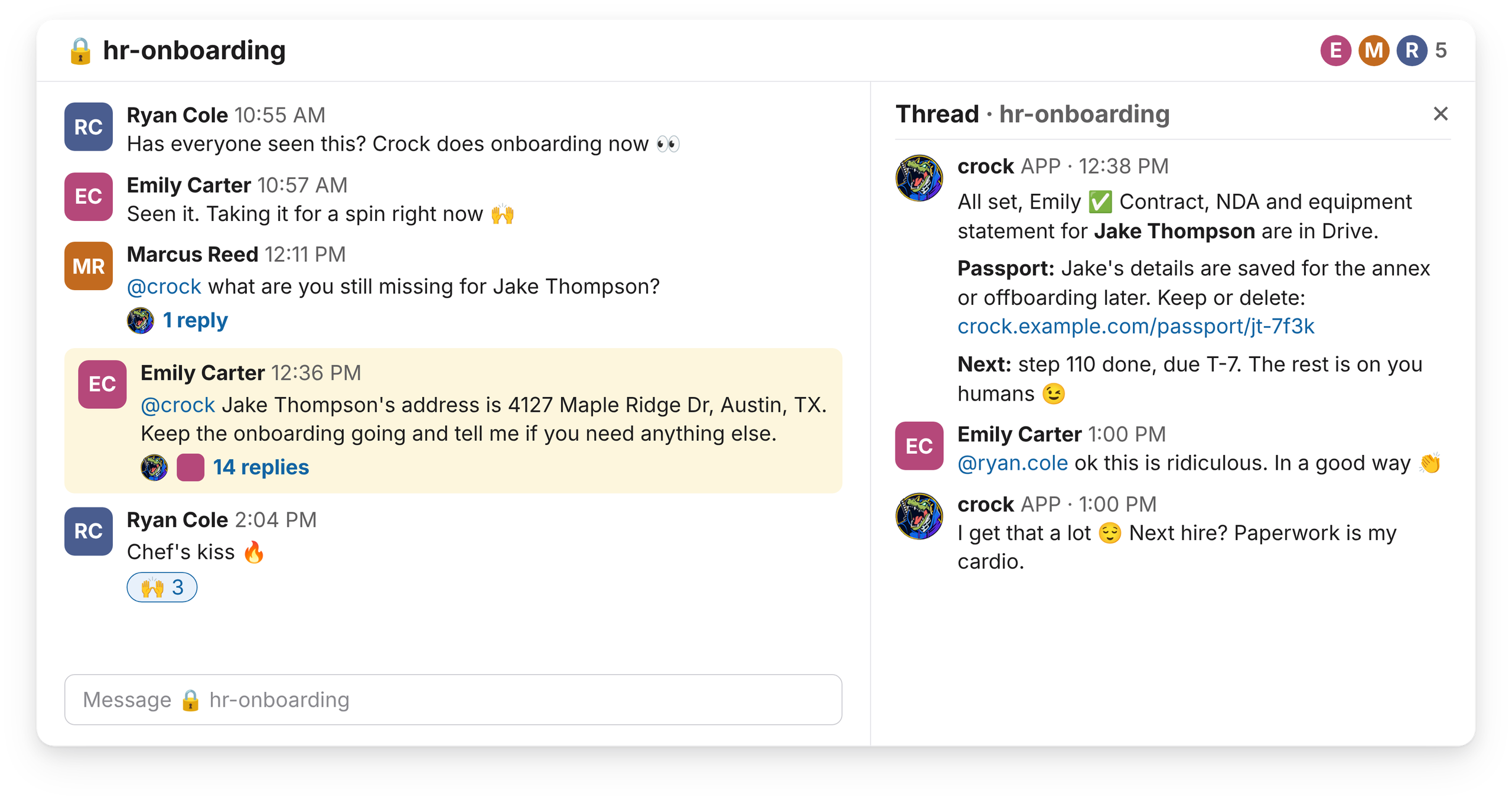
An HR person opens the assistant in the web app or in Slack and describes what they need in plain language, for example “let’s onboard a new employee” or “annex for a salary raise”. The assistant works out which automation applies and takes it from there.
How a request runs
- The assistant reads the current templates directly from Google Drive, so a template edited and approved by a lawyer is used on the very next run, with no re-indexing and no redeployment.
- It sends one numbered message asking for everything that is missing, such as company, signatory, dates, and position.
- Sensitive values are not typed into the chat. The person opens a secure form in the browser and enters them there, and each field is validated by type (for example, national ID format and tax ID check digit).
- The assistant builds a plan. A confirmation page shows the real values and exactly what will be written, and a person reviews it and approves.
- Only after approval are the documents created, as filled copies of the templates in a new Drive folder named after the subject. The assistant returns the links and lists what still needs to be ticked by hand.
- A completion notice goes out by email or Slack. It never contains personal data.
Passports
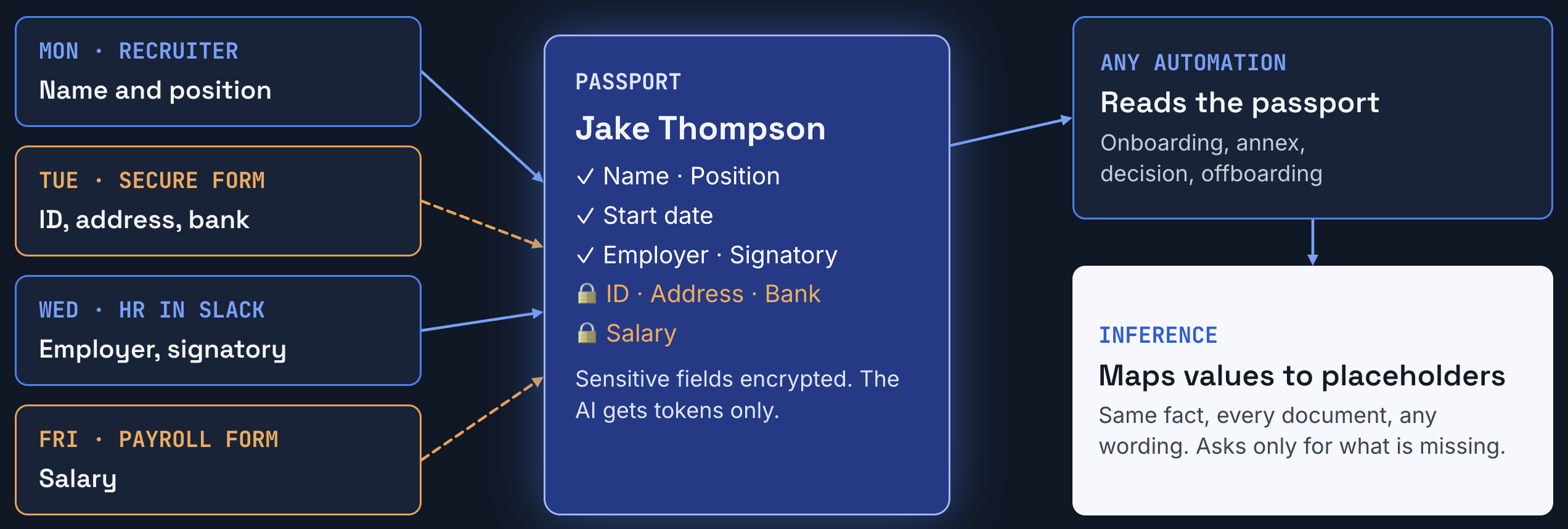
A passport is a single record for each person or company. Every HR automation reads from it and writes to it: onboarding, contract annexes, decisions and offboarding. A fact entered once stays available to every later process for that person. It works for employees and contractors who are individuals, and for contractors who are companies. Each kind can only hold the details that apply to it, so a company record can never hold a national ID number.
How it works
- Created: when an automation starts for someone new, the assistant first confirms their name exactly as spelled, then opens the passport.
- Filled over time: details arrive over several days, from different people. Any HR user with access can add them in later conversations. Sensitive values still come in only through the secure form, never through chat.
- Reused: every later run reads the passport first and asks only for what’s missing. A salary annex months later starts with everything already known.
- Protected: sensitive values are encrypted, with the key kept outside the database. Each value is tied to its passport and field, so it can’t be moved onto another record.
- Kept or deleted: at the end of a process, a person decides whether to keep the passport for later or delete it. The assistant never deletes anything.
A dashboard shows every open case: who started it, when it was last updated, and what’s still missing. It shows names and counts only, never sensitive data.
Why we chose it
Onboarding never happens in one sitting. The details behind 2 to 10 legal documents arrive over days, from recruiters, HR and payroll. Without a shared record, someone would have to retype everything for each document set. Values entered in earlier conversations would also be lost, because the secure vault used during a run is cleared when the run ends. The passport stores everything in one encrypted place that every process can reuse, so later work on the same person starts complete. Deleting personal data is a decision with legal weight, so that stays with a person.
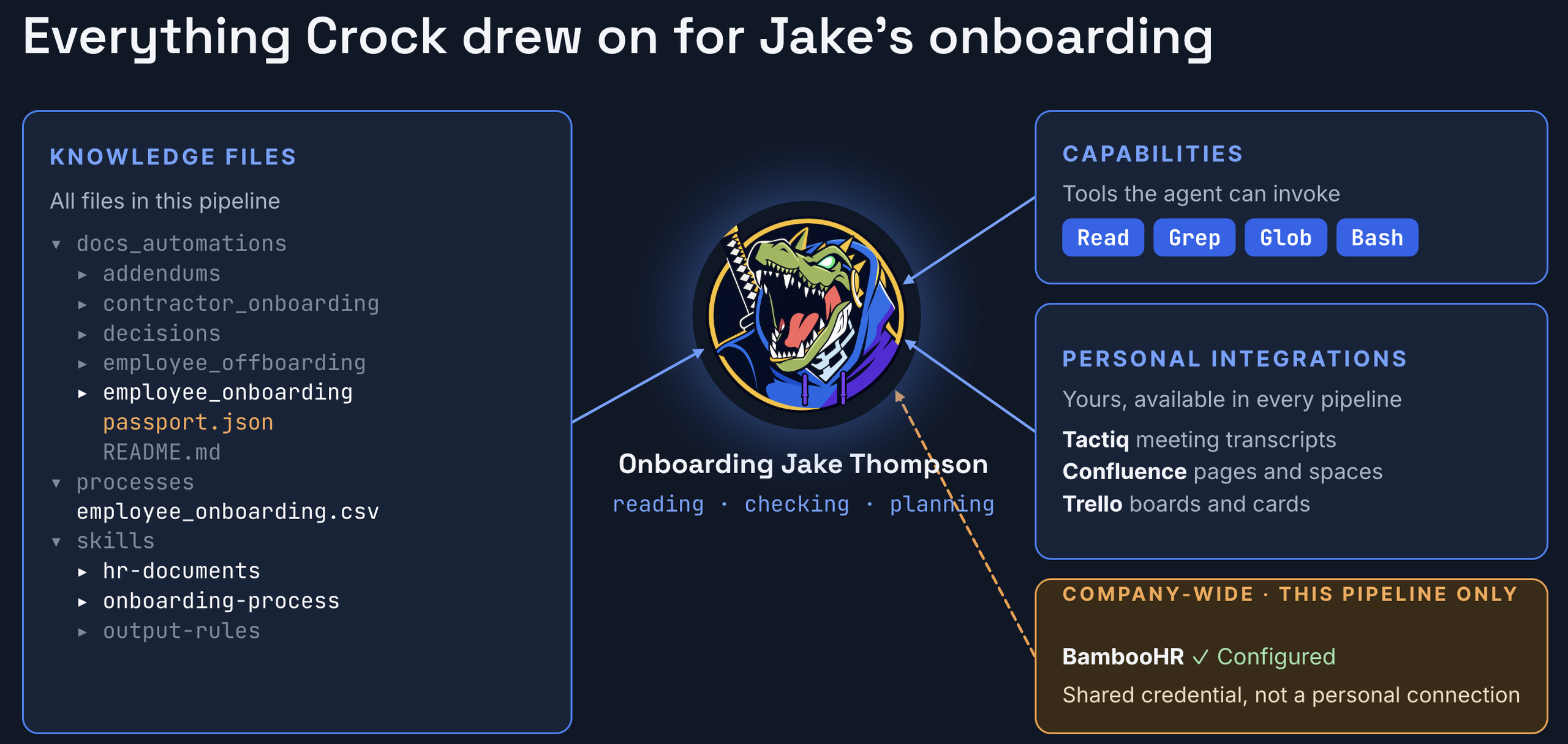
A person is in the loop at two points: data entry through the secure form, and approval on the confirmation page.
Why HR, finance and operations can approve it
The questions a budget holder asks first are about control and risk. These are the controls built into the system.
- Personal data stays out of the AI. The model receives opaque tokens in place of sensitive values. The real values are substituted by our server only at the moment the document is written. The vault holding them is in memory only and is cleared when the run ends.
- The AI cannot create anything nobody approved. The server refuses a plan with any missing value, and nothing is written until a person confirms.
- Templates are never changed. They are only read and copied, and existing folders are never overwritten. Corrections create numbered copies.
- Access is restricted. The app sits behind an IP allowlist and Google sign-in, with access granted per automation and per folder. Stored sensitive values are encrypted at rest.
- Every run is recorded. An audit table logs the automation, folder, user, and status, without personal data.
- The assistant has no tool to delete or edit templates. It can only do what the tools we give it allow.
The principle behind this is that prompts guide the model and the server guarantees the rules. The model does the reading and thinking, and the server enforces what is allowed to happen.
The result
Before automation, preparing these document sets took our HR team about 12 hours a week. With the assistant, it takes about 10 minutes. The remaining time is the human review that we deliberately kept.
Documents are assembled from the current legal templates, and the required fields are checked by the server before anything is created. This removes the copy-and-paste steps where errors normally enter.
We tested the system before relying on it: roughly 300 automated checks on the HR engine, more than 100 checks on the shared person record, and 19 routing scenarios with a real model. A safety test also fails if any sensitive-data detector is removed, and created documents are compared paragraph by paragraph with the preview the person approved.
Built to be extended
Each automation is a folder with a definition file and a plain-language rules file. Adding a new process needs no new code, no build, and no restart, and HR can adjust behaviour by editing text.
The first run used Serbian labor law and Serbian-language templates. It can be expanded to other jurisdictions and languages by providing the templates and rules for them. The same engine also runs automations outside HR.
Do you have a high-volume document process?
HR contracts are one example. Any process with repeated documents, sensitive data, and a need for sign-off is a candidate. Book a call with BlueGrid.io, and we will look at your process and tell you whether we can do the same for you.